nerdexam
Microsoft

MB-335 · Question #163

Drag and Drop Question You are the product manager at an orange juice manufacturing company. For every 1,000 pounds of orange juice, 20 pounds of orange pulp is created which can be sold or reused pro

The correct answer is Create a new formula and formula version for orange juice.; Set Total cost allocation on the header to true.; Add a co-product line for orange pulp and enter a quantity of 20 pounds per 1,000 pounds.; Select Per quantity as the by-product cost allocation.. Explanation: Orange Juice Formula with Co-Product Setup (Process Manufacturing / D365 SCM) Context This question tests knowledge of process manufacturing formula configuration - specifically how to model a production process that generates a valuable secondary output alongside th

Configure products

Question

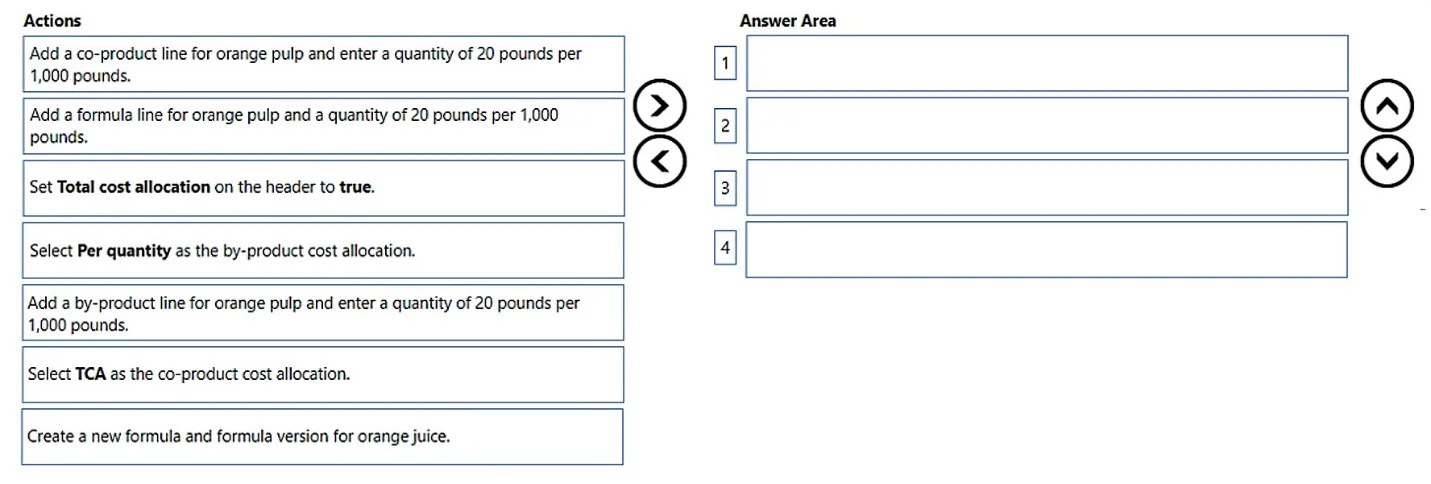
Drag and Drop Question You are the product manager at an orange juice manufacturing company. For every 1,000 pounds of orange juice, 20 pounds of orange pulp is created which can be sold or reused profitably. The cost is calculated as a weighted average between the quantity of orange juice that is reported as finished and the orange pulp based on the standard cost of each item. You need to create the formula for orange juice that will produce orange pulp as a result of finishing a batch order. Which four actions should you perform in sequence? To answer, move the appropriate actions from the list of actions to the answer area and arrange them in the correct order. Answer:

Exhibit
MB-335 question #163 exhibit

Answer Area

Drag items

Add a formula line for orange pulp and a quantity of 20 pounds per 1,000 pounds.Add a co-product line for orange pulp and a quantity of 20 pounds per 1,000 pounds.Set Total cost allocation on the header to true.Select Per quantity as the by-product cost allocation.Add a by-product line for orange pulp and enter a quantity of 20 pounds per 1,000 pounds.Select TCA as the co-product cost allocation.Create a new formula and formula version for orange juice.

Correct arrangement

  • Create a new formula and formula version for orange juice.
  • Set Total cost allocation on the header to true.
  • Add a co-product line for orange pulp and enter a quantity of 20 pounds per 1,000 pounds.
  • Select Per quantity as the by-product cost allocation.

Explanation

Explanation: Orange Juice Formula with Co-Product Setup (Process Manufacturing / D365 SCM)

Context

This question tests knowledge of process manufacturing formula configuration - specifically how to model a production process that generates a valuable secondary output alongside the primary product. The system (Microsoft Dynamics 365 Supply Chain Management) distinguishes between:

  • Co-products: Secondary outputs with significant economic value (can be sold or reused profitably)
  • By-products: Secondary outputs with minimal value
  • Formula lines: Input ingredient lines, not output lines

The cost description - "weighted average between orange juice and orange pulp based on standard cost" - is the key signal pointing to Total Cost Allocation (TCA).


Step-by-Step Breakdown

Step 1 - Create a new formula and formula version for orange juice

Why first: This is the mandatory prerequisite. Every subsequent configuration (header settings, output lines, cost allocation) lives inside the formula. You cannot configure what doesn't exist yet. This is never optional and always the starting point.


Step 2 - Set Total cost allocation on the header to true

Why second (before adding the co-product line): TCA must be enabled at the formula header level before co-product lines are configured, because it changes what cost allocation options are available on those lines. The scenario's wording - "weighted average based on the standard cost of each item" - is the definition of TCA: it splits production costs proportionally between outputs using each item's standard cost ratio. Enabling this after adding lines can lead to misconfiguration.


Step 3 - Add a co-product line for orange pulp and a quantity of 20 pounds per 1,000 pounds

Why third and why co-product (not by-product): Orange pulp "can be sold or reused profitably" - this is the explicit signal that it has significant economic value and must be classified as a co-product, not a by-product. A by-product line would undervalue it and apply an incorrect (and less precise) cost allocation model. The formula header is already configured (steps 1–2), so the co-product line is added here with the correct quantity ratio.


Step 4 - Select Per quantity as the by-product cost allocation

Why last: Once the co-product line exists, you must specify how its cost share is calculated at the line level. "Per quantity" allocates cost based on the ratio of quantities produced - consistent with a 1,000:20 lb ratio producing a calculable cost split. This is set last because you can only configure a line's cost allocation after the line exists.

Note on terminology: This step uses the phrase "by-product cost allocation," which is slightly misleading since orange pulp was added as a co-product in step 3. This is a common source of confusion. In the D365 UI, the cost allocation field appears on both co-product and by-product lines; the exam question's label may reflect a UI field name or a loose use of terminology. The critical concept is that the allocation method is configured at the line level, after the line and header settings are in place.


Common Mistakes & Misconceptions

MistakeWhy It's Wrong
Choosing "Add a formula line" for orange pulpFormula lines are input ingredients, not outputs. Putting pulp here models it as something you consume, not produce.
Choosing "Add a by-product line"Orange pulp has explicit profit value - by-product classification is semantically wrong and applies a less accurate cost model.
Choosing "Select TCA as the co-product cost allocation"TCA is set at the header level (step 2), not per-line. This is the most common confusion - candidates mix up where TCA is toggled.
Setting TCA after adding linesConfiguration order matters; header settings govern what options are valid on output lines.

Summary Logic

Create formula → Enable TCA at header → Add co-product line → Set line-level cost allocation

The ordering follows a parent-before-child rule: you must have the container (formula), then the header setting (TCA), then the line, then the line's sub-configuration.

Topics

#formula#co-product#total cost allocation#process manufacturing

Community Discussion

No community discussion yet for this question.

Full MB-335 Practice