
MB-335 · Question #144
Drag and Drop Question A company uses Dynamics 365 Supply Chain Management. Several production orders are in the started status. An issue with equipment causes a rollback in the production status…
The correct answer is Released; Estimated. D365 SCM Production Order Status Rollback - Exam Explanation Production Order Status Lifecycle (Reference) `` Created → Estimated → Released → Started → Reported as Finished → Ended `` When equipment fails and orders are in Started status, you can roll back to an earlier…
Question
Drag and Drop Question A company uses Dynamics 365 Supply Chain Management. Several production orders are in the started status. An issue with equipment causes a rollback in the production status for some of the orders. Some orders must be reset once the equipment is repaired, based on which products were being manufactured. You need to reset the production orders based on the requirements. Which status should you use for each requirement? To answer, drag the appropriate statuses to the correct requirements. Each status may be used once, more than once, or not at all. You may need to drag the split bar between panes or scroll to view content. NOTE: Each correct selection is worth one point. Answer:
Exhibit
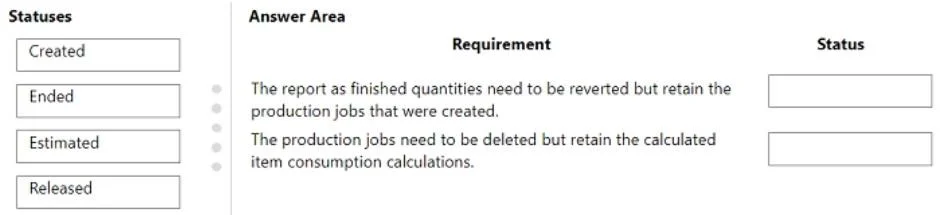
Answer Area
Drag items
Correct arrangement
- Released
- Estimated
Explanation
D365 SCM Production Order Status Rollback - Exam Explanation
Production Order Status Lifecycle (Reference)
Created → Estimated → Released → Started → Reported as Finished → Ended
When equipment fails and orders are in Started status, you can roll back to an earlier status. The rollback target depends on what needs to happen to the order.
Why These Two Statuses Are Correct
Position 1 → Released
Scenario: The production order only needs to undo the Start operation - materials are already issued, the route is still valid, and production can resume once equipment is repaired.
Technical reason: Rolling back from Started → Released reverses the start journal (labor/machine time already posted) but keeps the order on the shop floor with materials already picked/reserved. The order is ready to be started again immediately after repair.
Use when: The product's BOM and route are still accurate; only the "in-progress" work needs to be undone.
Position 2 → Estimated
Scenario: The production order must undo both the Start and the Release - for example, if the product's routing or resource requirements need to be re-evaluated before restarting.
Technical reason: Rolling back from Started → Estimated reverses the release to the shop floor and the start posting. The order loses its shop floor assignment and must be re-released before it can be started again. This is a deeper reset.
Use when: The product's resource/route configuration may have changed due to the equipment issue, requiring re-release.
Why the Other Statuses Are Wrong Here
| Status | Why Not Used |
|---|---|
| Created | Too far back - strips estimates; not needed for a repair rollback |
| Ended | Moves the order forward (closes it), the opposite of a rollback |
Common Misconceptions
- "Created" seems like the most complete reset - it is, but it's excessive and would require re-running estimation and release, which isn't warranted by an equipment repair scenario.
- Confusing rollback direction with "Ended" - Ended is a forward status that closes the order for costing. It has nothing to do with resetting work in progress.
- The key distinction between the two correct answers is depth of rollback: Released = undo Start only; Estimated = undo Start + Release.
Topics
Community Discussion
No community discussion yet for this question.