
MB-310 · Question #97
Drag and Drop Question A client is implementing fixed assets in Dynamics 365 Finance. You need to specify which parameters should be configured to meet the business requirements. Which parameters…
The correct answer is Select Allow asset acquisition from Purchasing.; Select Create asset during product receipt or invoice posting.; Set up the capitalization threshold amount.; Select Restrict asset acquisition posting to a user group.; Select Allow asset acquisition from Purchasing.; Set up the capitalization threshold amount.; Select Restrict asset acquisition posting to a user group.; Select Create asset during product receipt or invoice posting. Dynamics 365 Finance - Fixed Assets Parameters: Explained > Note: The question as provided is missing the actual requirement descriptions (the "drop targets"). The arrangement shows 8 requirement slots mapped to 4 parameters. Below I'll explain each parameter's purpose and the…
Question
Exhibit
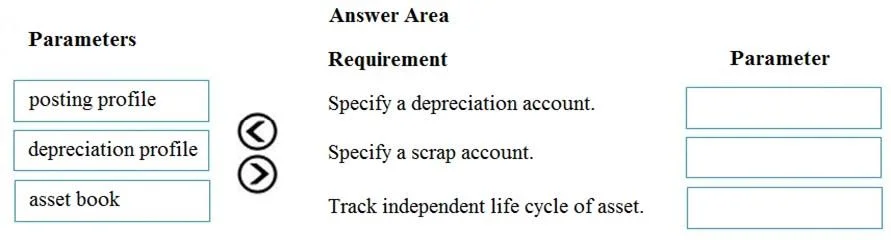
Answer Area
Drag items
Correct arrangement
- Select Allow asset acquisition from Purchasing.
- Select Create asset during product receipt or invoice posting.
- Set up the capitalization threshold amount.
- Select Restrict asset acquisition posting to a user group.
- Select Allow asset acquisition from Purchasing.
- Set up the capitalization threshold amount.
- Select Restrict asset acquisition posting to a user group.
- Select Create asset during product receipt or invoice posting.
Explanation
Dynamics 365 Finance - Fixed Assets Parameters: Explained
Note: The question as provided is missing the actual requirement descriptions (the "drop targets"). The arrangement shows 8 requirement slots mapped to 4 parameters. Below I'll explain each parameter's purpose and the logic behind the mapping pattern.
The Four Parameters: What They Do
1. Allow Asset Acquisition from Purchasing
Found in Fixed Assets > Setup > Fixed Asset Parameters > General tab. Enables integration between the Procurement/AP module and Fixed Assets. When checked, purchase orders and vendor invoices can trigger asset acquisition transactions - without it, FA and Purchasing are completely siloed.
2. Create Asset During Product Receipt or Invoice Posting
A dependent sub-option of the above. Once AP/FA integration is enabled, this parameter tells the system to automatically generate the fixed asset record at the moment of product receipt or invoice posting, rather than requiring a manual asset creation step afterward.
3. Set Up the Capitalization Threshold Amount
Found in Fixed Assets > Setup > Fixed Asset Parameters > General tab. Defines the minimum monetary value an item must reach to be capitalized as a fixed asset. Items below this threshold are automatically expensed, even if coded to a fixed asset procurement category. This enforces your capitalization policy automatically.
4. Restrict Asset Acquisition Posting to a User Group
A security/internal control parameter that limits which users can post acquisition transactions. This enforces segregation of duties - ensuring only authorized roles (e.g., Fixed Assets Accountant) can finalize asset acquisitions.
The Arrangement Logic (8 Slots → 4 Parameters)
Since parameters can be reused, the 8 requirement slots map as follows:
| Slot | Parameter Assigned | Why |
|---|---|---|
| 1 | Allow asset acquisition from Purchasing | A requirement to enable PO-based or AP-based asset acquisition - this is the prerequisite toggle |
| 2 | Create asset during product receipt or invoice posting | A requirement to auto-create assets at receiving/invoice time - builds on slot 1 being enabled |
| 3 | Set up the capitalization threshold amount | A requirement to define minimum capitalization value (e.g., "only capitalize items ≥ $2,500") |
| 4 | Restrict asset acquisition posting to a user group | A requirement for access control / segregation of duties on asset posting |
| 5 | Allow asset acquisition from Purchasing | A second scenario requiring AP/Purchasing integration (e.g., vendor invoice route specifically) |
| 6 | Set up the capitalization threshold amount | A second scenario where auto-expensing below a threshold is needed |
| 7 | Restrict asset acquisition posting to a user group | A second access control scenario (e.g., compliance audit requirement) |
| 8 | Create asset during product receipt or invoice posting | A second auto-creation scenario, specifically at invoice posting time |
Key Technical Reasons for Each Placement
Slots 1 & 5 - Allow asset acquisition from Purchasing: This is the master switch for AP/FA integration. Any requirement involving creating or acquiring assets through purchase orders or vendor invoices requires this parameter first. It appears twice because both "product receipt" and "vendor invoice" flows need it enabled.
Slots 2 & 8 - Create asset during product receipt or invoice posting: This is the automation layer on top of the AP integration. Without it, you'd need to manually run the FA acquisition proposal. It appears twice because there are typically two distinct business scenarios: one triggered at product receipt and one at invoice posting.
Slots 3 & 6 - Set up the capitalization threshold: The threshold applies in multiple scenarios - both when deciding whether a purchased item should become an asset and when determining whether low-value items should be expensed automatically. Two different requirements (capitalization policy enforcement, and auto-expensing of low-value items) point to the same parameter.
Slots 4 & 7 - Restrict asset acquisition posting to a user group: Internal controls often appear in multiple policy requirements (e.g., "only accountants can post" AND "comply with SOX controls"). Same parameter satisfies both compliance-related requirements.
Common Mistakes & Misconceptions
-
Confusing slots 1 and 2 as independent - "Create asset during product receipt" does nothing if "Allow asset acquisition from Purchasing" is not also checked. Slot 1 is a prerequisite for slot 2.
-
Thinking the capitalization threshold is in Procurement - It's in Fixed Asset Parameters, not in item groups or procurement categories. Candidates often look in the wrong module.
-
Treating "Restrict to user group" as optional - On exams, any requirement mentioning compliance, authorization, or role-based control maps to this parameter. Don't overlook it as just a "nice to have."
-
Assuming each parameter is used only once - The question explicitly states parameters can be reused. This is by design, as the same system parameter can satisfy multiple distinct business requirements.
Topics
Community Discussion
No community discussion yet for this question.