
MB-310 · Question #69
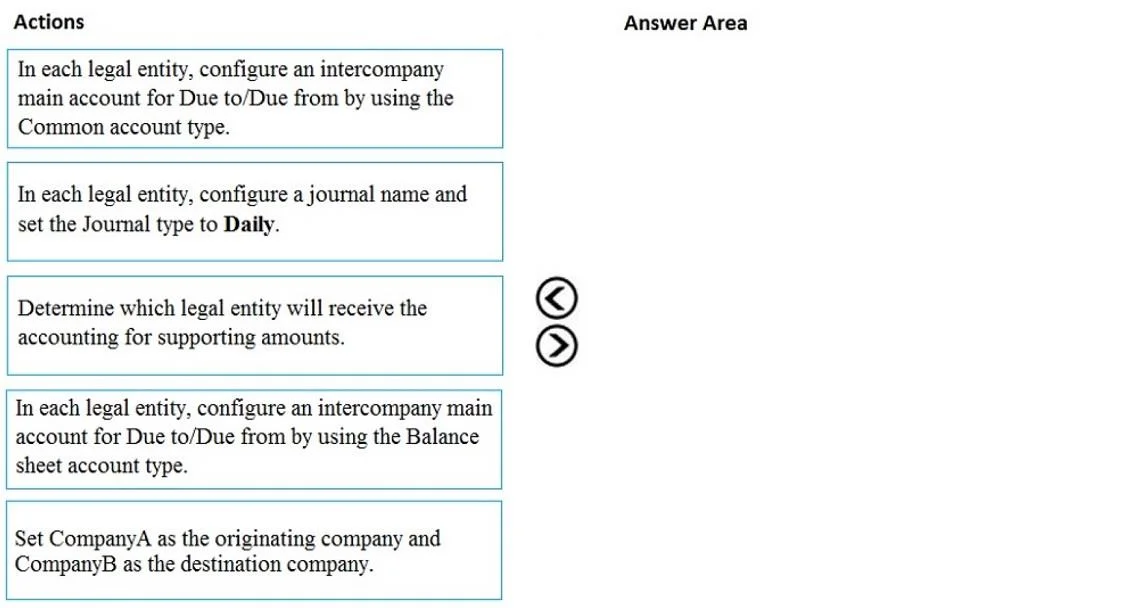
Drag and Drop Question You are configuring a Dynamics 365 Finance environment for intercompany accounting. You create the following legal entities: - CompanyA - CompanyB You need to configure…
The correct answer is In each legal entity, configure an intercompany main account for Due to/Due from by using the Balance sheet account type.; In each legal entity, configure a journal name and set the Journal type to Daily.; Determine which legal entity will receive the accounting for supporting amounts. Intercompany Accounting Setup in Dynamics 365 Finance Why This Order? Intercompany accounting in D365 Finance follows a dependency chain: you must create the foundational ledger accounts first, then configure the journal mechanism, then define the intercompany relationship…
Question
Exhibit
Answer Area
Drag items
Correct arrangement
- In each legal entity, configure an intercompany main account for Due to/Due from by using the Balance sheet account type.
- In each legal entity, configure a journal name and set the Journal type to Daily.
- Determine which legal entity will receive the accounting for supporting amounts.
Explanation
Intercompany Accounting Setup in Dynamics 365 Finance
Why This Order?
Intercompany accounting in D365 Finance follows a dependency chain: you must create the foundational ledger accounts first, then configure the journal mechanism, then define the intercompany relationship rules. Each step depends on the previous one existing.
Step-by-Step Breakdown
Step 1: Configure intercompany main accounts using the Balance sheet account type
This is the non-negotiable first step. D365 Finance requires "Due to" and "Due from" accounts to exist in each legal entity's chart of accounts before any intercompany setup can reference them.
- The account type must be Balance sheet - these accounts represent intercompany receivables and payables, which are balance sheet items (assets/liabilities).
- The Common account type is a distractor and is incorrect here. "Common" is used for shared/cross-module accounts, not for intercompany clearing accounts. Selecting "Common" is the most common mistake on this topic.
- Must be done in each legal entity (CompanyA and CompanyB independently).
Step 2: Configure a journal name with Journal type set to Daily
With accounts in place, each legal entity needs a journal configured to post intercompany entries through.
- Intercompany transactions post through Daily journals - this is the required journal type in D365 Finance for general ledger intercompany entries.
- This journal name is referenced later when you set up the intercompany accounting relationship (step 3), so it must exist first.
- Again, must be done in each legal entity separately.
Step 3: Determine which legal entity will receive the accounting for supporting amounts
This is the actual intercompany accounting configuration step (found at General Ledger > Posting setup > Intercompany accounting). Here you define the "from/to" relationship between legal entities and specify:
- Which company books supporting entries (e.g., tax, financial dimensions)
- The Due to/Due from accounts to use (referencing step 1)
- The journal to post through (referencing step 2)
This step can only be completed after steps 1 and 2 because it directly references both the accounts and journal names.
Why the Other Items Are Wrong
| Item | Why Excluded |
|---|---|
| Common account type | Intercompany clearing accounts must be Balance sheet type. "Common" does not represent the liability/asset nature of Due to/Due from accounts. |
| Set CompanyA as originating, CompanyB as destination | This is misleading - D365 Finance intercompany setup creates bidirectional pairs (from/to), not a fixed originating company. Originating vs. destination is determined at transaction time, not as a system configuration. |
Key Misconception to Avoid
Many candidates confuse account type = Common with intercompany accounts because "Common" sounds like it would apply across companies. In D365 Finance, "Common" refers to accounts usable across modules within a single entity - it has nothing to do with cross-entity posting. Always use Balance sheet for Due to/Due from accounts.
Topics
Community Discussion
No community discussion yet for this question.