
MB-310 · Question #66
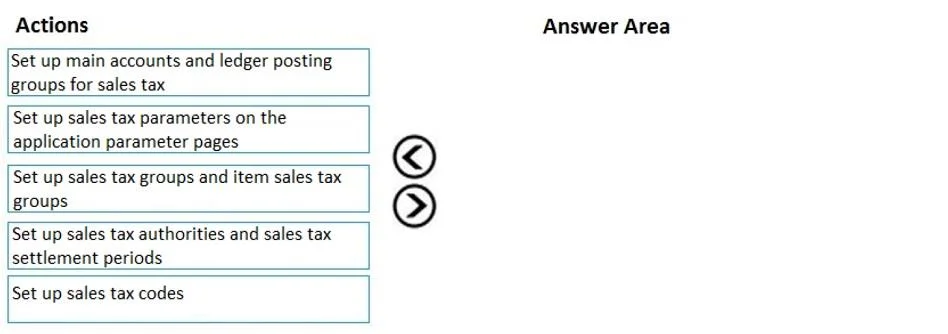
Drag and Drop Question A retail company has outlets in multiple locations. Taxes vary depending on the location. You need to configure the various components of the tax framework. In which order…
The correct answer is Set up main accounts and ledger posting groups for sales tax; Set up sales tax authorities and sales tax settlement periods; Set up sales tax codes; Set up sales tax groups and item sales tax groups; Set up sales tax parameters on the application parameter pages. Configuring the Sales Tax Framework - Order Explained This question is from Microsoft Dynamics 365 Finance (formerly AX). The correct order follows a strict dependency chain: each component must exist before the next one can reference it. --- The Core Principle > Configure the…
Question
Exhibit
Answer Area
Drag items
Correct arrangement
- Set up main accounts and ledger posting groups for sales tax
- Set up sales tax authorities and sales tax settlement periods
- Set up sales tax codes
- Set up sales tax groups and item sales tax groups
- Set up sales tax parameters on the application parameter pages
Explanation
Configuring the Sales Tax Framework - Order Explained
This question is from Microsoft Dynamics 365 Finance (formerly AX). The correct order follows a strict dependency chain: each component must exist before the next one can reference it.
The Core Principle
Configure the foundation before what depends on it. Every step references something from the step before it.
Step-by-Step Breakdown
1. Set up main accounts and ledger posting groups for sales tax
Why first? Ledger posting groups map tax transactions to specific General Ledger (GL) accounts (e.g., "Tax Payable", "Tax Receivable"). These are the financial backbone of the entire tax framework.
- Sales tax codes (step 3) require a ledger posting group to know where to post.
- Without these accounts, nothing downstream can be saved or configured properly.
Common mistake: Skipping this and going straight to codes - you'll find the posting group field is required and empty.
2. Set up sales tax authorities and sales tax settlement periods
Why second? Authorities represent the government agencies you remit tax to (e.g., IRS, a state revenue department). Settlement periods define how often and when you remit (monthly, quarterly, etc.).
- Sales tax codes must be linked to both an authority and a settlement period.
- These are prerequisites for tax codes - they cannot be configured after the fact without going back and editing every code.
Common mistake: Thinking authorities and periods can be set up alongside codes. In practice, the tax code form requires them at creation time.
3. Set up sales tax codes
Why third? Tax codes define the actual rate (e.g., 8%) and calculation method for a specific tax. Each code references:
- A ledger posting group (from step 1)
- A sales tax authority + settlement period (from step 2)
All dependencies are now satisfied, so codes can be fully configured.
Common mistake: Placing this before authorities/periods. The system will prompt for them and you won't have valid options to select.
4. Set up sales tax groups and item sales tax groups
Why fourth? These are containers (groups) that hold one or more tax codes.
- Sales tax groups attach to customers or vendors (who is buying/selling).
- Item sales tax groups attach to products or services (what is being bought/sold).
- The intersection of both groups on a transaction determines which codes actually apply.
Since groups reference tax codes, the codes from step 3 must already exist.
Common mistake: Confusing the two group types. Both are required - neither alone is sufficient to trigger tax calculation on a transaction.
5. Set up sales tax parameters on the application parameter pages
Why last? Parameters are system-wide settings that reference everything configured above (default tax groups, rounding rules, calculation methods, ledger integration settings). These finalize and activate the tax framework.
- This step ties everything together at the application level.
- Configuring parameters before the underlying components exist means you'd have empty dropdowns with nothing valid to select.
Common mistake: Doing this first out of habit (since "parameters" sounds like a starting point). In this framework, they are the finishing step, not the starting point.
Summary Table
| Step | Component | Depends On |
|---|---|---|
| 1 | Main accounts & posting groups | Nothing - pure GL setup |
| 2 | Authorities & settlement periods | Nothing - but needed by codes |
| 3 | Sales tax codes | Steps 1 and 2 |
| 4 | Tax groups & item tax groups | Step 3 (codes must exist) |
| 5 | Application parameters | Everything above |
The pattern is accounts → agencies → rates → groupings → system settings - always build foundations before references.
Topics
Community Discussion
No community discussion yet for this question.