
MB-310 · Question #186
Drag and Drop Question You are processing checks in Dynamics 365 Finance for a client. You need to identify the outcome of the processed checks. What is the check status for each scenario? To…
The correct answer is Cancelled; Void; Paid; Created. Dynamics 365 Finance: Check Statuses Explained Context The scenarios (not fully shown in your question text) map to the four check statuses in D365 Finance. This is a standard MB-310 exam topic. Here's how each status works and why it maps to each scenario: --- The Four…
Question
Exhibit
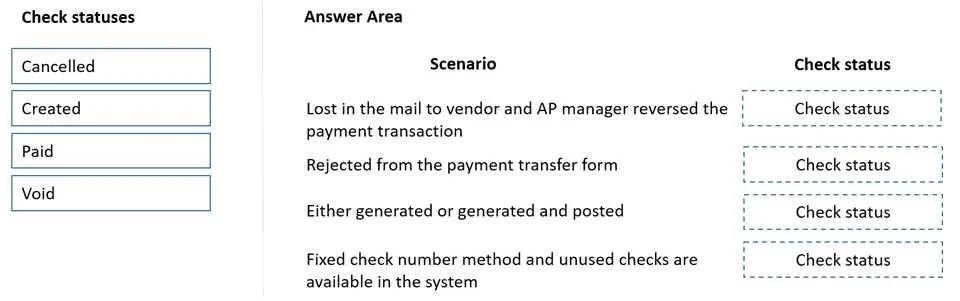
Answer Area
Drag items
Correct arrangement
- Cancelled
- Void
- Paid
- Created
Explanation
Dynamics 365 Finance: Check Statuses Explained
Context
The scenarios (not fully shown in your question text) map to the four check statuses in D365 Finance. This is a standard MB-310 exam topic. Here's how each status works and why it maps to each scenario:
The Four Statuses & Their Scenarios
1. Cancelled
Scenario: A check payment was posted, then later reversed/voided after posting.
- This occurs when you use the payment reversal function on an already-posted check
- The original posted transaction is negated, and the check status becomes Cancelled
- Key distinction: the payment was fully processed before the reversal
2. Void
Scenario: A check was printed but voided before the journal was posted (e.g., printer jam, wrong amount printed).
- You mark the check number as void in the check register
- No financial posting ever occurred
- Key distinction: Void = pre-posting error; the check never counted as a real payment
3. Paid
Scenario: A check journal was posted successfully with no issues.
- The vendor payment is recorded, the check clears normally
- This is the standard end-state for a successful check payment
4. Created
Scenario: A check has been generated/printed but the payment journal has NOT yet been posted.
- The check number is assigned and the document exists, but it's still in draft
- No accounting entries have hit the ledger yet
Common Misconceptions
| Mistake | Clarification |
|---|---|
| Confusing Void and Cancelled | Void = before posting; Cancelled = after posting |
| Thinking Created means the journal line was just typed | It specifically means the check was printed but journal is unposted |
| Assuming Cancelled deletes the record | It reverses it - the original and reversal both remain |
The core rule: the status reflects where in the posting lifecycle the check stopped - before, during, after, or reversed.
Topics
Community Discussion
No community discussion yet for this question.