
MB-310 · Question #122
Case Study 2 - Munson Background Munson's Pickles and Preserves Farm grows and distributes produce, jellies, and jams. The company's corporate headquarters is located in Dallas, TX. Munson's has one…
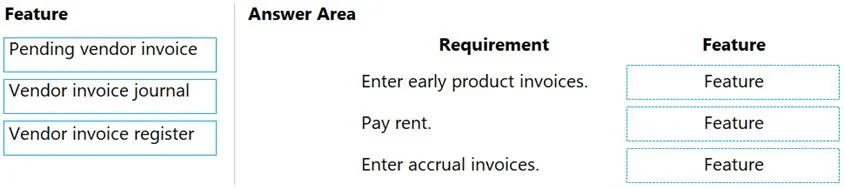
The correct answer is Pending vendor invoice; Vendor invoice journal; Vendor invoice register. Dynamics 365 Finance - Invoicing Features Explained The Three Requirements Being Matched The drag-and-drop maps three distinct invoicing scenarios from the case study to three D365 Finance features. Each feature solves a different AP workflow problem. --- Item 1: Pending Vendor…
Question
Exhibit
Answer Area
Drag items
Correct arrangement
- Pending vendor invoice
- Vendor invoice journal
- Vendor invoice register
Explanation
Dynamics 365 Finance - Invoicing Features Explained
The Three Requirements Being Matched
The drag-and-drop maps three distinct invoicing scenarios from the case study to three D365 Finance features. Each feature solves a different AP workflow problem.
Item 1: Pending Vendor Invoice → Requirement 1
Requirement: "AP must be able to enter vendor invoices on the day they were received to be settled against when product is received."
The case study notes that vendor invoices typically arrive before goods do. A Pending Vendor Invoice is the correct tool because:
- It is tied to a Purchase Order, so three-way matching (PO → receipt → invoice) can be enforced
- The invoice sits in a pending/unposted state until the product arrives and the packing slip is posted
- It does not prematurely post a liability - it waits for the receipt to settle against
- This directly supports the three-way matching requirement elsewhere in the case study
Common mistake: Confusing this with the Register. The Register does not link to a PO and cannot settle against a product receipt.
Item 2: Vendor Invoice Journal → Requirement 2
Requirement: Rent - "not paid by purchase order, due once a quarter."
A Vendor Invoice Journal is used for non-PO invoices that should post directly to an expense account with no accrual step. It is ideal for:
- Recurring, predictable expenses like rent
- Situations where no purchase order exists and no receiving document is needed
- Immediate ledger posting without an intermediate approval workflow
Common mistake: Using the Register for rent. The Register creates an accrual that requires a second approval step - overkill for a straightforward, known quarterly charge.
Item 3: Vendor Invoice Register → Requirement 3
Requirement: "AP must be able to enter vendor invoices to accrue expense without specifying a purchase order at the time of entry."
The Vendor Invoice Register is designed precisely for this scenario:
- Allows rapid invoice entry without a PO reference
- Posts to an accrual/suspense account (not the final expense account), recording the liability immediately
- The invoice must later be approved via the Invoice Approval Journal, at which point it posts to the correct expense account
- Satisfies the need to recognize the liability on the day the invoice is received, even without full coding
Common mistake: Choosing the Vendor Invoice Journal here. The Journal posts directly and finally to the ledger - it does not create an accrual. If the requirement says "accrue," the Register is correct.
Quick Reference Summary
| Feature | Requires PO? | Creates Accrual? | Use Case |
|---|---|---|---|
| Pending Vendor Invoice | Yes | No (settles on receipt) | PO-based invoices received before goods |
| Vendor Invoice Journal | No | No (direct post) | Known non-PO expenses (rent, utilities) |
| Vendor Invoice Register | No | Yes | Accrue liability now, approve/code later |
The key differentiator is: PO or no PO, and if no PO, accrual or direct post.
Topics
Community Discussion
No community discussion yet for this question.