MB-280 · Question #82
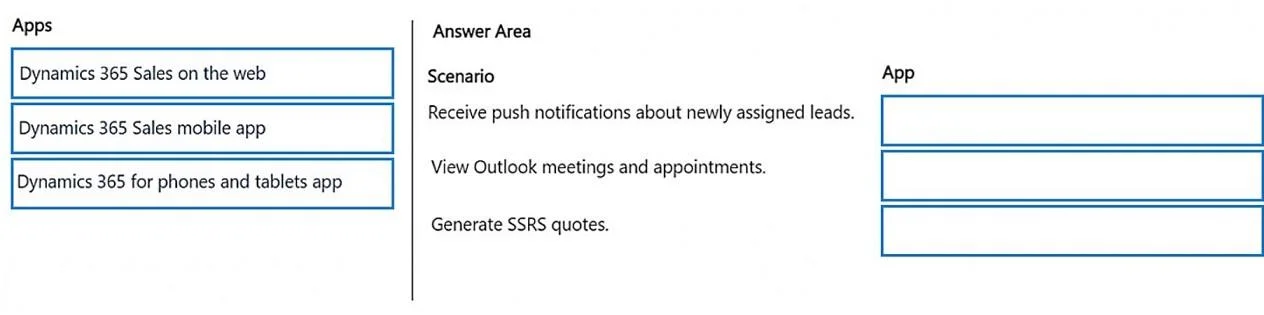
Drag and Drop Question A company has implemented Dynamics 365 Sales Enterprise. The salespeople often travel to meet customers and require mobile-friendly solutions to various scenarios. You need to…
The correct answer is Dynamics 365 Sales mobile app; Dynamics 365 for phones and tablets app; Dynamics 365 Sales on the web. Important Note The question as provided is incomplete - the scenario descriptions (what scenarios 1, 2, and 3 actually are) are missing. Only the available apps and correct answers were included. I'll explain each app and its typical use-case match based on standard Microsoft…
Question
Exhibit
Answer Area
Drag items
Correct arrangement
- Dynamics 365 Sales mobile app
- Dynamics 365 for phones and tablets app
- Dynamics 365 Sales on the web
Explanation
Important Note
The question as provided is incomplete - the scenario descriptions (what scenarios 1, 2, and 3 actually are) are missing. Only the available apps and correct answers were included. I'll explain each app and its typical use-case match based on standard Microsoft exam questions of this type (likely MB-210).
Understanding the Three Apps
1. Dynamics 365 Sales mobile app → Scenario 1
What it is: The purpose-built, modern mobile app specifically designed for sales professionals on the go.
Key technical reasons it gets top billing:
- Offline capability - salespeople can view and edit records without an internet connection, syncing when connectivity returns
- Optimized UX for phones: business card scanning, one-tap call logging, meeting prep summaries
- Designed around the salesperson's daily workflow, not just a mobile port of the web app
Typical scenario match: "A salesperson needs to update records while traveling in areas with no reliable internet."
2. Dynamics 365 for phones and tablets app → Scenario 2
What it is: The older Unified Interface-based mobile app that renders Dynamics 365 on mobile devices.
Key technical reasons:
- Works on both phones and tablets - more general-purpose device support
- Requires internet connectivity (limited/no offline support compared to the Sales mobile app)
- Provides broader access to Dynamics 365 entities beyond just Sales-specific workflows
- Being phased out in favor of the Sales mobile app, but still valid for general mobile access
Typical scenario match: "A salesperson needs to access and update Dynamics 365 records from their tablet while at a customer site with Wi-Fi."
3. Dynamics 365 Sales on the web → Scenario 3
What it is: The full browser-based version of Dynamics 365 Sales.
Key technical reasons:
- Requires a stable internet connection and a browser
- Provides the most complete feature set - advanced configuration, reports, dashboards, admin settings
- Not mobile-optimized; best on a laptop/desktop
- No offline capability at all
Typical scenario match: "A salesperson back at a hotel with a laptop needs to run detailed reports or perform complex record updates."
Common Mistakes & Misconceptions
| Misconception | Reality |
|---|---|
| "Sales mobile app and Phones/Tablets app are the same" | They are distinct apps. Sales mobile app is newer, offline-capable, and Sales-specific. |
| "Web version works fine on mobile" | Technically true, but it's not the recommended solution for mobile scenarios. |
| "Phones and Tablets app supports offline" | It has very limited offline support; the Sales mobile app is the correct choice for offline scenarios. |
| "Web is never the answer for travelers" | If the scenario specifies a laptop with reliable connectivity and need for full features, the web is correct. |
Bottom line: The key differentiator on exams is offline access (Sales mobile app) vs. general mobile access with connectivity (Phones and Tablets app) vs. full-featured access on a laptop (web).
Topics
Community Discussion
No community discussion yet for this question.