nerdexam
Microsoft

MB-280 · Question #150

Drag and Drop Question You are the administrator for Dynamics 365 Sales at an organization using Standard Sales Insights. The sales team wants to access the Premium Insights features. They have alread

The correct answer is Navigate to the Sales Hub app.; Access Sales Insights settings.; Accept the Terms and Conditions for premium features and select Get Started.. Enabling Premium Sales Insights in Dynamics 365 Sales Context The organization already has Standard Sales Insights running and has purchased + assigned Premium licenses. The task is activation, not installation or provisioning from scratch. That distinction drives the entire answ

Configure Dynamics 365 Sales standard and premium features

Question

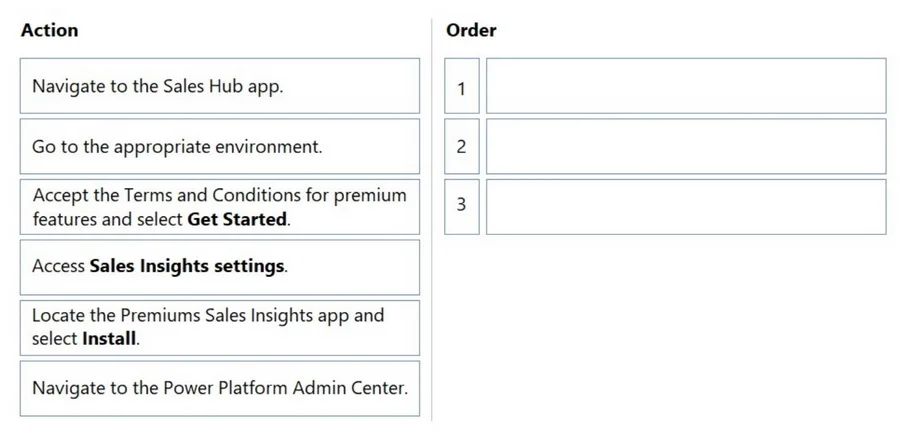
Drag and Drop Question You are the administrator for Dynamics 365 Sales at an organization using Standard Sales Insights. The sales team wants to access the Premium Insights features. They have already purchased and assigned premium licenses. You need to enable the premium features. Which three actions should you perform in sequence? To answer, move the three appropriate actions from the list of actions to the answer area. Arrange the three actions in the correct order. Answer:

Exhibit
MB-280 question #150 exhibit

Answer Area

Drag items

Navigate to the Sales Hub app.Go to the appropriate environment.Accept the Terms and Conditions for premium features and select Get Started.Access Sales Insights settings.Locate the Premiums Sales Insights app and select Install.Navigate to the Power Platform Admin Center.

Correct arrangement

  • Navigate to the Sales Hub app.
  • Access Sales Insights settings.
  • Accept the Terms and Conditions for premium features and select Get Started.

Explanation

Enabling Premium Sales Insights in Dynamics 365 Sales

Context

The organization already has Standard Sales Insights running and has purchased + assigned Premium licenses. The task is activation, not installation or provisioning from scratch. That distinction drives the entire answer.


Why This Specific Sequence

Step 1: Navigate to the Sales Hub app

Why it's first: Premium Sales Insights configuration lives inside the Sales Hub application, not in the Power Platform Admin Center. The Sales Hub is the entry point for all Sales Insights administration. You cannot reach the premium activation screen without being in this app first.

Common mistake: Many candidates assume the first step is to go to the Power Platform Admin Center (PPAC) because PPAC is where environment-level administration typically happens. PPAC is used for installing the Sales Insights solution initially - but since standard Sales Insights is already running, that work is done. Activation of premium features happens from within the app itself.

Step 2: Access Sales Insights settings

Why it's second: Once inside Sales Hub, you navigate to the Sales Insights settings area (via the bottom-left area switcher → Sales Insights Settings). This is where the premium feature toggles and the Terms & Conditions prompt are surfaced. You cannot reach Step 3 without being in this settings area first.

Common mistake: Skipping this step or conflating it with Step 3. The settings area is a distinct navigation destination - it's not a button you click on the home screen.

Step 3: Accept the Terms and Conditions and select Get Started

Why it's third: With premium licenses already assigned, the system gates activation behind a T&C acceptance. Once you accept and click Get Started, the premium features (Conversation Intelligence, Predictive Scoring, etc.) are enabled for the org. This is the final unlock step - it cannot happen before you're in the correct settings screen.


Why the Distractors Are Wrong

DistractorWhy It's Excluded
Navigate to the Power Platform Admin CenterUsed for initial solution install, not for enabling premium features after licenses are assigned.
Go to the appropriate environmentEnvironment context is handled implicitly when you open Sales Hub. It's not a discrete admin step in this flow.
Locate the Premium Sales Insights app and select InstallRelevant only if Sales Insights wasn't installed at all. Since Standard is already active, there's nothing to install - only features to activate.

Key Takeaway

The question tests whether you know that premium feature activation is an in-app configuration step, not a Power Platform Admin Center or AppSource install operation. The licenses create eligibility; the T&C acceptance inside Sales Insights settings is what actually switches the features on.

Topics

#Sales Insights#premium features#license assignment#Sales Hub settings

Community Discussion

No community discussion yet for this question.

Full MB-280 Practice