
Microsoft
MB-280 · Question #148
Drag and Drop Question You manage the Dynamics 365 Customer Insights applications at a cosmetics retail firm. Your marketing team wants to be able to branch contacts in a journey to receive a…
Sign in or unlock MB-280 to reveal the answer and full explanation for question #148. The question stem and answer options stay visible for context.
Analyze and segment data
Question
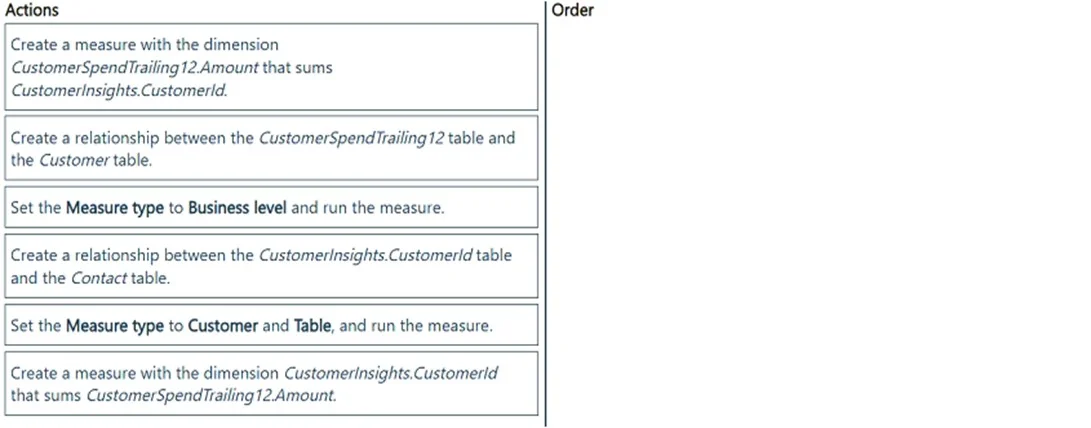
Drag and Drop Question You manage the Dynamics 365 Customer Insights applications at a cosmetics retail firm. Your marketing team wants to be able to branch contacts in a journey to receive a premium offer email if the contacts' total spend in the past 12 months is greater than $500. However, data on lifetime spend is not an attribute in the Contact table or any standard related tables in Microsoft Dataverse. Within Dynamics 365 Customer Insights - Data, you have ingested a table named "CustomerSpendTrailing12" that includes all customer transactions made in the past 12 months. The spend is held per transaction in a column named Amount. You need to enable the marketing team to execute this journey branch design without making changes to standard tables in Dataverse. Which three actions should you perform in sequence? To answer, move the three appropriate actions from the list of actions to the answer area. Arrange the three actions in the correct order. Answer:
Exhibit
Answer Area
Drag items
Create a measure with the dimension CustomerInsights.CustomerId and the CustomerInsight.CustomerSpendTrailing12.Amount that sums CustomerInsights.CustomerId.Create a relationship between the CustomerSpendTrailing12 table and the Customer table.Set the Measure type to Business level and run the measure.Create a relationship between the CustomerInsights.CustomerId table and the Contact table.Set the Measure type to Customer and Table, and run the measure.Create a measure with the dimension CustomerInsights.CustomerId that sums CustomerSpendTrailing12.Amount.
Unlock MB-280 to see the answer
You've previewed enough free MB-280 questions. Unlock MB-280 for full answers, explanations, the timed quiz mode, progress tracking, and the master PDF. Question stem and options stay visible so you can still see what's on the exam.
Topics
#calculated measures#journey branching#Customer Insights - Data#segments