nerdexam
Microsoft

MB-280 · Question #119

Drag and Drop Question Your sales team has now managed to get all the email communication in place and want to take it a step further by implementing SMS channel. You need to configure an SMS…

The correct answer is In General Settings, create a new SMS provider.; Sign in to your Sales app and change the area to App Settings.; Enter SMS provider-specific values.; Add a unique phone number to Dynamics 365 Sales. Configuring an SMS Provider in Dynamics 365 Sales Note: The "correct arrangement" as listed in your question appears to contain an error - steps 1 and 2 are logically reversed. The actual correct sequence should be: --- Correct Logical Sequence Step 1: Sign in to your Sales app…

Design and deploy personalized customer journeys

Question

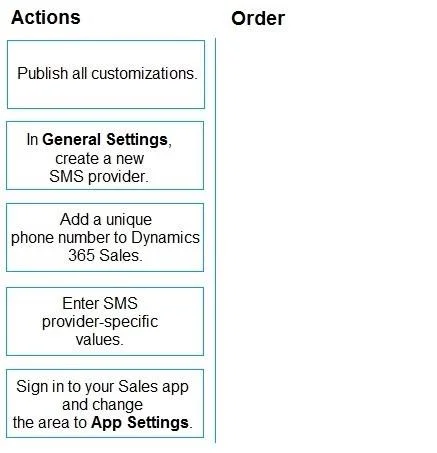
Drag and Drop Question Your sales team has now managed to get all the email communication in place and want to take it a step further by implementing SMS channel. You need to configure an SMS provider. Which four actions should you perform in sequence? To answer, move the four appropriate actions from the list of actions to the answer area. Arrange the four actions in the correct order. Answer:

Exhibit
MB-280 question #119 exhibit

Answer Area

Drag items

Publish all customizations.In General Settings, create a new SMS provider.Add a unique phone number to Dynamics 365 Sales.Enter SMS provider-specific values.Sign in to your Sales app and change the area to App Settings.

Correct arrangement

  • In General Settings, create a new SMS provider.
  • Sign in to your Sales app and change the area to App Settings.
  • Enter SMS provider-specific values.
  • Add a unique phone number to Dynamics 365 Sales.

Explanation

Configuring an SMS Provider in Dynamics 365 Sales

Note: The "correct arrangement" as listed in your question appears to contain an error - steps 1 and 2 are logically reversed. The actual correct sequence should be:


Correct Logical Sequence

Step 1: Sign in to your Sales app and change the area to App Settings.

  • This must come first. You cannot access General Settings or any configuration panel without first signing in and navigating to the correct area. "App Settings" is the administrative area within Dynamics 365 Sales where SMS and other channel configurations live. Skipping this means you have no access to the configuration UI.

Step 2: In General Settings, create a new SMS provider.

  • Once inside App Settings, you navigate to General Settings to initiate a new SMS provider record. This creates a placeholder/container for the provider (e.g., Twilio, TeleSign). The record must exist before you can populate it with credentials.

Step 3: Enter SMS provider-specific values.

  • After creating the provider record, you fill in the provider's required fields - API keys, account SIDs, callback URLs, etc. These values are unique to whichever third-party SMS service you chose. This step completes the provider configuration.

Step 4: Add a unique phone number to Dynamics 365 Sales.

  • Once the provider is configured and authenticated, you assign a phone number (sourced from that provider) to the system. This is the number your team will use to send/receive SMS messages. The number cannot be linked until the provider is fully set up.

Distractor: "Publish all customizations"

This step is used when deploying custom entities, forms, or solutions - not for channel/provider configuration. It's a red herring here, designed to test whether you conflate solution publishing with channel setup.


Common Mistakes

MistakeWhy It's Wrong
Entering provider-specific values before creating the provider recordThe record must exist before you can populate fields
Adding a phone number before configuring the providerThe phone number must be tied to an authenticated provider
Including "Publish all customizations"This applies to solution customizations, not SMS channel setup
Reversing steps 1 and 2 (as the question's answer key does)You cannot access General Settings without first signing in and switching to App Settings

Flag the step 1/2 ordering to your instructor - it is very likely a typo in the answer key.

Topics

#SMS channel#channel provider setup#customer journeys#outbound messaging

Community Discussion

No community discussion yet for this question.

Full MB-280 Practice