
Microsoft
MB-280 · Question #167
Case Study 3 - CRONUS International Ltd General overview CRONUS International Ltd. produces commercial printing supplies. Currently, CRONUS organizes its products under three (3) main printer…
Important Note The answer choices (source_items) and the correct_arrangement are empty in the question as provided - the actual drag-and-drop options were not captured. However, I can reconstruct the correct 5-step sequence based on the case study requirements and how Customer…
Design and deploy personalized customer journeys
Question
Case Study 3 - CRONUS International Ltd General overview CRONUS International Ltd. produces commercial printing supplies. Currently, CRONUS organizes its products under three (3) main printer brands. CRONUS engages in demand generation: - The marketing team captures and qualifies leads, then routes qualified leads to the sales teams. - The sales teams send their own follow-up communications to potential customers after a lead has been routed to them. Sales team members only have access to the Sales Hub app and are UNABLE to trigger Customer Insights - Journeys emails. Existing environment CRONUS has implemented Dynamics 365 Sales and Dynamics 365 Customer Insights - Journeys. The website for CRONUS is built on WordPress. A form created in Customer Insights - Journeys has been embedded on the website's "Contact Us" page. - The form is configured to create Lead records upon submission. - Submitting a "Contact Us" form initiates the creation of a Lead which is then reviewed by a marketing user. The Lead will either be disqualified or routed to the correct team using a business process flow. Currently, Customer Insights - Journeys is used to send weekly email newsletters to Contacts based on which of the three (3) printer brands the Contact's company has purchased most recently. CRONUS uses the default settings provisioned with the Customer Insights -Journeys application. Aside from domain authentication of the CRONUS web and email domain, no new settings have been created. New situation Upcoming conference CRONUS has an upcoming annual conference where they plan to launch a partnership with a fourth (4th) printer brand. The chief marketing officer's (CMO's) priority is to optimize the demand generation processes related to the conference. The launch strategy The CMO wants to achieve a strong return on investment (ROI) by attracting sponsors to the conference. CRONUS will hire celebrity speakers for the conference to increase interest overall and to boost the brand launch event. These speakers have previously been registered and configured in Customer Insights - Journeys. They will be booked and managed by Allure Bays Corp, a third-party supplier. The supplier has been added to Entra via guest access and have Dynamics 365 licenses. Implementation of the strategy Pre-conference awareness A teaser page will be published one (1) month prior to the conference to generate a list of interested Leads. Leads will be nurtured with pre-conference content and receive a registration launch announcement in email. If the Lead clicks on the "Learn More" link in the registration launch email, the link will take them to an event-specific portal, where they can sign-up for the conference as a whole, as well as various tracks and individual sessions - including the launch sessions. Existing Contacts will also receive the registration launch email and be able to sign up for sessions. Registration campaign stages If a Lead or Contact registers for one of the product launch sessions, they should NO longer receive additional invitations to register for product launch sessions. Any Leads and Contacts who do NOT click on the "Learn More" link should be sent an additional launch announcement email reminding them to the register. Registration routing Anyone registering for a product launch session should be directed to the sales team. - If the registrant has an existing account owner, the registrant should be routed to that account owner. The account owner will send them a "Contact Outreach" email using CRONUS branding. - If the registrant does NOT have an existing account owner, they should be routed to the inside sales team. The inside sales team will send them a "Lead Outreach" email using conference branding. Event management The event will be held in CRONUS's own "Presentation Building" with several usable rooms. The CMO indicated that the "Presentation Room" should be used for the product launch sessions, while the "Conference Room" can be used for other larger sessions. The CMO has several expectations for the event: 1. Accessibility- All rooms must be designed for accessibility. 2. Engagement - There are multiple formats available for the rooms. Specifically for the product launch sessions, the "Theater" format must be used to optimize engagement. 3. Attribution - It is necessary to be able to report on the Sponsorship amount achieved, as well as "New Opportunities," and ultimately "Opportunities Closed as Won," resulting from attendees of the product launch sessions. 4. Interest - The ROI for the product launch sessions must be optimized. Given that the room can only accommodate 100 guests and the event can only cater to 200 guests, the CMO wants to personally review which Contacts to add from high-value accounts if the room is close to capacity. New requirements Customer Insights - Journeys requirements The conference strategy requires the following in Customer Insights - Journeys: - Create new lead capture form for the pre-conference page, creating Leads on submission. - Create registration components. - Create conference event and session records, including the following where appropriate: - Sponsors - Speakers - Room layouts - Ensure registered Leads and Contacts are removed from the registration launch journey when they have registered for a product launch session. - Ensure Leads and Contacts are routed to the correct account owner or Inside sales team members. - Ensure account owners and inside sales team members have the correctly branded email templates to use in their one-to-one communication to Leads. Other requirements Since the launch is quickly approaching, the web team does NOT want to commit to developing new Word Press landing pages. - The new landing pages must be standalone pages hosted by Customer Insights - Journeys. - The default registration forms must be used. - The event portal must be a Power Pages portal. The portal must include the conference hero image, the conference logo, and a gallery of sessions guests can sign up for. Currently, most users of Customer Insights - Journeys have a standard "CRONUS Marketer" security role assigned. However, third-party suppliers are NOT allowed to have access to Contact data, so the IT team has created a new security role named "Event Configurator" that allows access to Event records but NOT to Contact data. Drag and Drop Question Your next task in Dynamics 365 Customer Insights - Journeys is to create the registration journey for existing Contacts to go live next week. You decide NOT to use Copilot to create the journey on this occasion. Which five actions should you perform in sequence? To answer, move the five appropriate actions from the list of actions to the answer area. Arrange the five actions in the correct order. Answer:
Exhibit
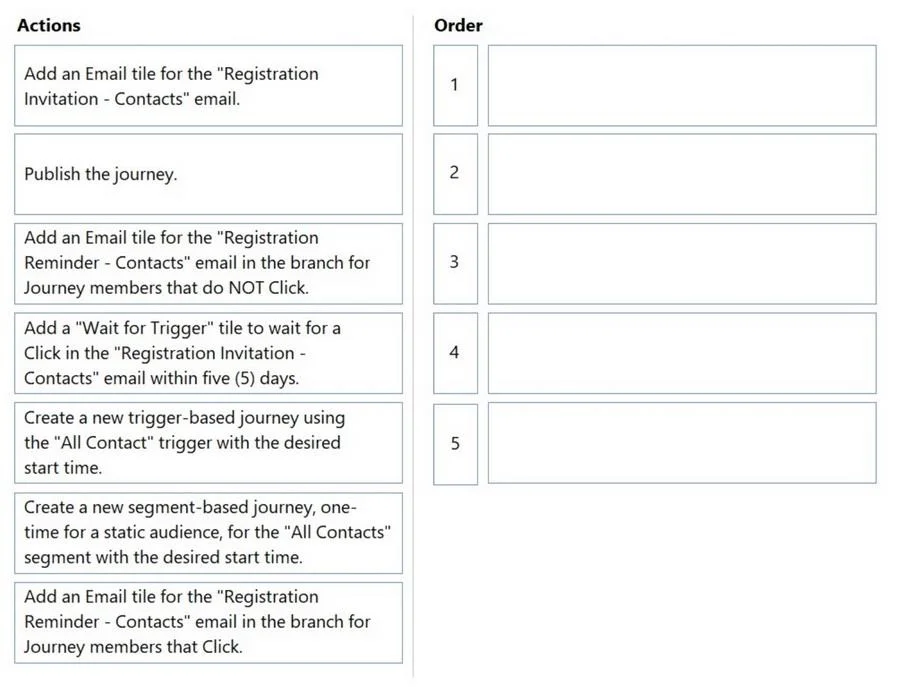
Answer Area
Explanation
Important Note
The answer choices (source_items) and the correct_arrangement are empty in the question as provided - the actual drag-and-drop options were not captured. However, I can reconstruct the correct 5-step sequence based on the case study requirements and how Customer Insights - Journeys (CIJ) works.
Context: What This Journey Must Do
The task is to create a segment-based journey for existing Contacts that:
- Sends a registration launch announcement email
- Branches based on whether the Contact clicks "Learn More"
- Sends a reminder to non-clickers
- Exits Contacts from the journey once they register for a product launch session
- Routes registrants to the correct owner or inside sales
The Correct 5-Step Sequence (Without Copilot)
| Step | Action | Why This Order |
|---|---|---|
| 1 | Navigate to Journeys > New Journey, then skip/dismiss Copilot and select "Start from scratch" | You must explicitly opt out of Copilot before building manually |
| 2 | Set journey type to Segment-based and select the existing Contacts segment | Contacts are a pre-existing audience, not triggered by a new event - segment-based is the correct type |
| 3 | Add a "Send an email" tile using the registration launch announcement email | The first action in the journey is always the email that initiates engagement |
| 4 | Add an "If/then branch" tile checking whether the Contact clicked the "Learn More" link | Branching logic must follow the email - you cannot branch before the trigger action |
| 5 | Configure an exit condition (suppress/remove from journey) when a Contact registers for a product launch session | This fulfills the requirement: "If a Lead or Contact registers for a product launch session, they should NO longer receive additional invitations" |
Key Technical Reasons
- Segment-based vs. Trigger-based: Existing Contacts are targeted proactively via a segment, not by their own actions - so segment-based is correct. Using trigger-based would be wrong here.
- Exit condition vs. suppression segment: The requirement to stop receiving invitations upon registration is best handled with a journey exit condition tied to an event registration trigger, not a simple suppression list.
- Branch placement: The If/then branch must come after the email send tile because the branch evaluates interaction with that email (link click behavior).
- Copilot dismissal first: The question explicitly states you decide NOT to use Copilot - in the CIJ UI, you must actively skip Copilot at journey creation before you can manually configure.
Common Mistakes on This Question
- Choosing trigger-based journey instead of segment-based - existing Contacts need to be pushed into the journey, not pulled in by their own actions.
- Placing the exit condition before the branch - the exit should be global/ongoing, but logically it's configured as part of journey settings, not mid-canvas before the email.
- Forgetting to dismiss Copilot - this is a deliberate step in the question ("you decide NOT to use Copilot"), making it a valid first action.
- Adding the reminder email without a branch - sending the reminder to everyone (not just non-clickers) would violate the case study requirement.
- Confusing the reminder branch with routing - routing to sales is a separate process (handled via triggers/Power Automate or business process flow), not part of this 5-step journey build.
Topics
#customer journey#real-time journeys#contact registration#journey builder
Community Discussion
No community discussion yet for this question.