
MB-230 · Question #412
Drag and Drop Question A company has a Dynamics 365 Customer Service implementation that uses the voice channel feature. Supervisors need to review reports to see how the representatives are…
The correct answer is Conversation insights; Agent insights. Explanation The Two Metrics and Their Correct Report Matches --- Metric 1: Percentage of calls answered within 30 seconds (previous 4 hours) Correct Report: Conversation insights This metric is a service level measurement - it tracks how quickly calls are being picked up across…
Question
Drag and Drop Question A company has a Dynamics 365 Customer Service implementation that uses the voice channel feature. Supervisors need to review reports to see how the representatives are performing on the following metrics:
- Percentage of calls that are answered within 30 seconds in the
previous four hours.
- Number of calls that are rejected by each representative in the
previous four hours. You need to change the configuration of reports to ensure that they default to the requirements. Which reports should you configure? To answer, drag the appropriate reports to the correct metrics. Each report may be used once, more than once, or not at all. You may need to drag the split bar between panes or scroll to view content. NOTE: Each correct selection is worth one point. Answer:
Exhibit
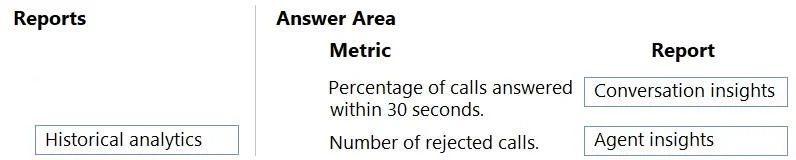
Answer Area
Drag items
Correct arrangement
- Conversation insights
- Agent insights
Explanation
Explanation
The Two Metrics and Their Correct Report Matches
Metric 1: Percentage of calls answered within 30 seconds (previous 4 hours)
Correct Report: Conversation insights
This metric is a service level measurement - it tracks how quickly calls are being picked up across the queue, not what any individual agent did. "Percentage answered within 30 seconds" is a conversation/queue-level KPI that Dynamics 365 surfaces in Conversation insights, which focuses on:
- Queue performance
- Call answer rates and speeds
- Service level thresholds
The 4-hour window aligns with the real-time/near-real-time scope that Conversation insights is designed to display by default.
Metric 2: Number of calls rejected by each representative (previous 4 hours)
Correct Report: Agent insights
"Rejected by each representative" is explicitly per-agent data. Agent insights is the report designed to break down performance at the individual agent level, including:
- Calls handled, rejected, or transferred per agent
- Agent-specific productivity metrics
Because the metric asks "by each representative," only Agent insights provides the per-agent breakdown required.
Why Historical analytics is not used
Historical analytics covers longer time ranges (typically days/weeks/months). The requirement here specifies previous four hours, which is a near-real-time window. Historical analytics does not default to that granularity, so it cannot satisfy either requirement. This is the most common mistake - confusing it with the correct reports because it sounds comprehensive.
Summary Table
| Metric | Report |
|---|---|
| % calls answered within 30 seconds (last 4 hrs) | Conversation insights |
| # calls rejected per representative (last 4 hrs) | Agent insights |
Topics
Community Discussion
No community discussion yet for this question.