
MB-230 · Question #360
Drag and Drop Question You create an IoT Central application to integrate with Dynamics 365 Customer Service Connected Customer Experience. You need to configure the application. Which features…
The correct answer is Device templates; Device groups; Jobs; Rules. IoT Central + Dynamics 365 Connected Customer Experience - Feature Mapping The question maps four IoT Central features to four requirements in order. While the requirement text isn't shown, the arrangement follows a logical workflow: model → organize → act → monitor. --- 1…
Question
Drag and Drop Question You create an IoT Central application to integrate with Dynamics 365 Customer Service Connected Customer Experience. You need to configure the application. Which features should you use? To answer, drag the appropriate features to the correct requirements. Each feature may be used once, more than once, or not at all. You may need to drag the split bar between panes or scroll to view content. NOTE: Each correct selection is worth one point. Answer:
Exhibit
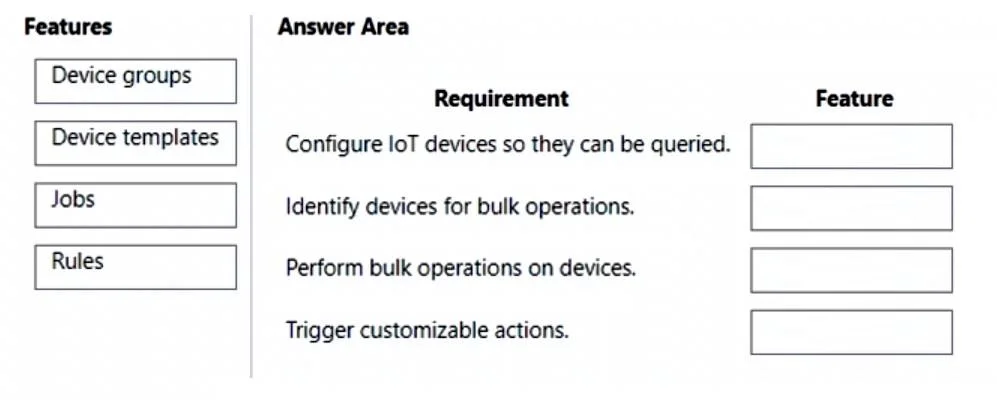
Answer Area
Drag items
Correct arrangement
- Device templates
- Device groups
- Jobs
- Rules
Explanation
IoT Central + Dynamics 365 Connected Customer Experience - Feature Mapping
The question maps four IoT Central features to four requirements in order. While the requirement text isn't shown, the arrangement follows a logical workflow: model → organize → act → monitor.
1. Device Templates
Purpose: Define the schema for a device - its telemetry, properties, and commands.
Why it goes first: Before anything else works, IoT Central needs to know what a device is and what data it produces. Device templates are the blueprint. Without them, devices can't be provisioned correctly and D365 has no structured data to consume.
2. Device Groups
Purpose: Logical collections of devices that share a common filter (e.g., same location, same template, same customer).
Why it goes second: Once devices are modeled (via templates), you group them so you can target subsets for bulk operations or monitoring. In the D365 integration, groups often map to customer accounts or asset categories.
3. Jobs
Purpose: Execute commands or property updates across a group of devices at scale.
Why it goes third: Jobs act on device groups. A D365 Customer Service agent might trigger a remote diagnostic or firmware update via a Job - this is the "response" side of the connected experience (e.g., fixing a customer's device remotely).
4. Rules
Purpose: Monitor telemetry and trigger automated actions when thresholds are met.
Why it goes last: Rules are what initiates the D365 Customer Service flow - they detect anomalies (e.g., temperature too high) and fire alerts/webhooks that create IoT Alerts in D365. This closes the loop by notifying support teams.
Common Mistakes
| Mistake | Why It's Wrong |
|---|---|
| Confusing Jobs and Rules | Rules detect conditions; Jobs execute commands. Rules are reactive triggers, Jobs are operational actions. |
| Skipping Device Groups for Jobs | Jobs require a target device group - you can't run a Job without one. |
| Thinking Device Templates are optional | Without templates, devices connect as "unassigned" and telemetry is unstructured - D365 can't map the data. |
| Using Rules to update devices | Rules can trigger actions (emails, webhooks, Power Automate), but they don't directly push commands to devices - that's Jobs. |
Topics
Community Discussion
No community discussion yet for this question.