MB-230 · Question #18
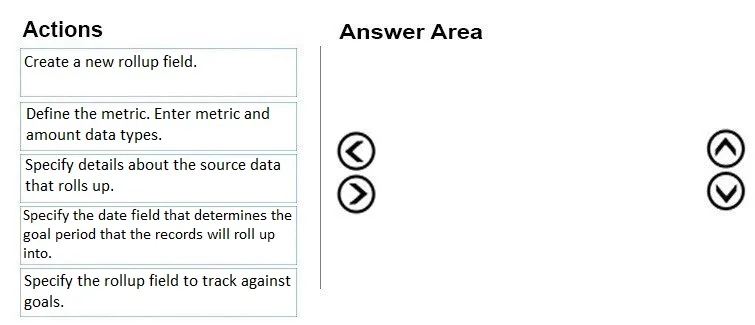
Drag and Drop Question You are a Dynamics 365 system administrator. Your customer service team must define goal metrics to track and measure all resolved cases. You need to create a goal metric with a
The correct answer is Define the metric. Enter metric and amount data types.; Create a new rollup field.; Specify the rollup field to track against goals.; Specify details about the source data that rolls up.; Specify the date field that determines the goal period that the records will roll up into.. Dynamics 365 Goal Metric with Rollup Field - Step-by-Step Explanation --- Why This Order Matters Creating a goal metric is a hierarchical process: each step depends on the previous one existing. You cannot configure what doesn't exist yet. --- Step-by-Step Breakdown 1. Define the
Question
Exhibit
Answer Area
Drag items
Correct arrangement
- Define the metric. Enter metric and amount data types.
- Create a new rollup field.
- Specify the rollup field to track against goals.
- Specify details about the source data that rolls up.
- Specify the date field that determines the goal period that the records will roll up into.
Explanation
Dynamics 365 Goal Metric with Rollup Field - Step-by-Step Explanation
Why This Order Matters
Creating a goal metric is a hierarchical process: each step depends on the previous one existing. You cannot configure what doesn't exist yet.
Step-by-Step Breakdown
1. Define the metric. Enter metric and amount data types.
This is the foundation. A Goal Metric record must exist before anything else can be attached to it. Here you choose:
- Metric Type: Count (number of records, e.g., resolved cases) or Amount (a monetary/numeric sum)
- Amount Data Type: Integer, Money, Decimal, etc.
Common mistake: Skipping straight to rollup fields without realizing the metric record is the parent container. Rollup fields are child records - the parent must exist first.
2. Create a new rollup field.
With the metric defined, you now add a rollup field to it. A rollup field defines what kind of value you're aggregating - Actual, In-Progress, or Custom. This is a separate record added to the metric.
Common mistake: Confusing "rollup field" with "rollup query." The rollup field is the tracking container; the query comes later.
3. Specify the rollup field to track against goals.
Now you configure the rollup field you just created - specifically which field on the target entity (e.g., the Case entity) maps to this rollup. This wires the rollup field to the actual data column it will aggregate.
Common mistake: Thinking this is the same as step 2. Step 2 creates the rollup field record; step 3 configures what that field tracks.
4. Specify details about the source data that rolls up.
This is the rollup query / filter criteria - defining which records qualify for aggregation (e.g., only Cases where Status = Resolved, for a specific team). Without this, the system doesn't know which records to include.
Common mistake: Placing this before step 3. You must first establish what field you're tracking before you can filter which records feed into it.
5. Specify the date field that determines the goal period that the records will roll up into.
Finally, you specify which date field on the source entity (e.g., Actual End Date on Cases) determines whether a record falls within the goal's active time period. This is the last configuration detail because it depends on knowing the source data structure defined in step 4.
Common mistake: Treating this as an early setup step. It is the final scoping constraint - it only makes sense once you know the entity and filtered record set.
Quick Mental Model
Metric (the "what" and "how")
└─ Rollup Field (the "container" for aggregation)
└─ Field mapping (the "which column")
└─ Source data filter (the "which records")
└─ Date field (the "which time window")
Each layer depends on the layer above it existing first. This dependency chain is exactly why the order is non-negotiable.
Topics
Community Discussion
No community discussion yet for this question.