
MB-230 · Question #153
Drag and Drop Question You are an Omnichannel supervisor for a company. The company wants to deploy an Omnichannel Insights dashboard. You need to set up and monitor KPIs. In which section is each…
The correct answer is Agent; Bot Insights; Channel; Conversation. Omnichannel Insights Dashboard - KPI Sections Explained > Note: The question as shared is missing the specific KPI names that map to positions 1–4. The explanation below covers what each section tracks and the logic behind placement, so you can apply it to the full question…
Question
Exhibit
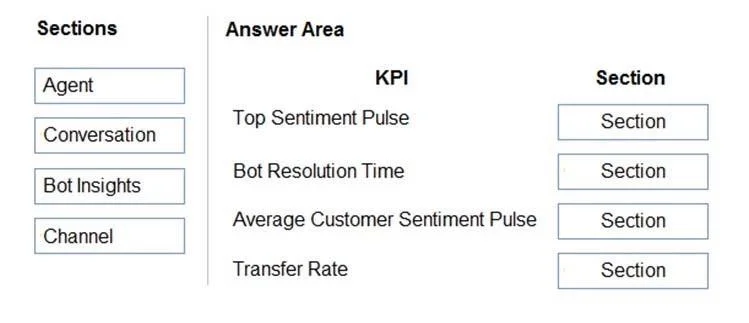
Answer Area
Drag items
Correct arrangement
- Agent
- Bot Insights
- Channel
- Conversation
Explanation
Omnichannel Insights Dashboard - KPI Sections Explained
Note: The question as shared is missing the specific KPI names that map to positions 1–4. The explanation below covers what each section tracks and the logic behind placement, so you can apply it to the full question.
The Four Sections in Omnichannel Insights (Dynamics 365)
1. Agent
Tracks individual agent and team performance within conversations.
Typical KPIs: Agent utilization rate, sessions handled, average session handle time, agent status distribution, average session sentiment.
Why it's its own section: These metrics measure how effectively human agents operate - workload, productivity, and responsiveness. They are distinct from conversation-level metrics because one conversation can involve multiple agents.
2. Bot Insights
Tracks virtual agent (bot/copilot) performance separately from human agents.
Typical KPIs: Bot resolution rate, bot escalation rate, bot conversation volume, bot CSAT scores.
Why it's its own section: Bots handle a distinct interaction flow. Conflating bot metrics with agent metrics would distort human performance data. Bot Insights lets supervisors evaluate automation effectiveness independently.
3. Channel
Tracks metrics broken down by communication channel (live chat, SMS, voice, social, email, etc.).
Typical KPIs: Conversation volume by channel, CSAT by channel, average handle time by channel, abandon rate by channel.
Why it's its own section: Channel-level data drives resourcing decisions - e.g., if SMS has a high abandon rate, you add SMS-trained agents. Without channel segmentation, you can't identify channel-specific problems.
4. Conversation
Tracks overall conversation health across all channels and agents.
Typical KPIs: Incoming conversations, conversations handled, average first response time, average handle time, transfer rate, abandon rate, overall CSAT.
Why it's its own section: These are the aggregate, queue-level metrics a supervisor monitors at a glance. They answer "how is the queue performing?" before drilling into agent or channel specifics.
Common Mistakes
| Mistake | Clarification |
|---|---|
| Putting "abandon rate" under Agent | Abandon rate is a Conversation metric - customers leave before an agent answers, not because of agent behavior. |
| Confusing Bot and Agent metrics | Bot escalation is Bot Insights; once a human takes over, subsequent metrics go to Agent. |
| Placing channel-specific CSAT under Conversation | Overall CSAT → Conversation; CSAT broken out per channel → Channel. |
| Thinking Bot Insights is under Agent | Bots are not agents in Dynamics 365 Omnichannel - they have a separate section precisely to distinguish automation from human performance. |
If you can share the specific KPI names from the original question (e.g., "Bot resolution rate", "Agent utilization"), I can map each one precisely to its correct section.
Topics
Community Discussion
No community discussion yet for this question.