
HPE7-A06 · Question #77
Drag and Drop Question Match each BGP element to its destination. Answer:
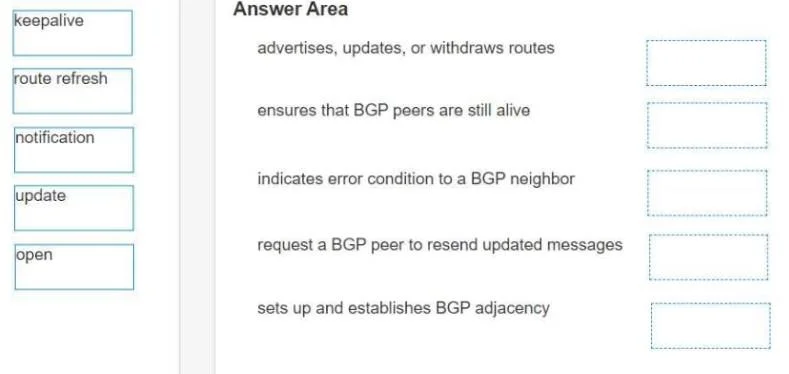
The correct answer is update; keepalive; notification; route refresh; open. BGP Message Types - Drag-and-Drop Explanation The question is almost certainly matching each BGP message type to a numbered description of its function. Based on the correct arrangement, here's what each position maps to: --- The Correct Arrangement | Position | Message |…
Question
Drag and Drop Question Match each BGP element to its destination. Answer:
Exhibit
Answer Area
Drag items
Correct arrangement
- update
- keepalive
- notification
- route refresh
- open
Explanation
BGP Message Types - Drag-and-Drop Explanation
The question is almost certainly matching each BGP message type to a numbered description of its function. Based on the correct arrangement, here's what each position maps to:
The Correct Arrangement
| Position | Message | Function |
|---|---|---|
| 1 | update | Carries routing information (prefixes, path attributes, withdrawn routes) |
| 2 | keepalive | Maintains an established session between peers |
| 3 | notification | Reports errors and terminates the session |
| 4 | route refresh | Requests a peer re-advertise its routes without resetting the session |
| 5 | open | Initiates the BGP session (first message exchanged) |
Individual Placements
1 → update The UPDATE message is the workhorse of BGP - it advertises reachable prefixes with path attributes (AS_PATH, NEXT_HOP, etc.) and withdraws unreachable ones. It's placed first because it represents BGP's primary purpose: routing information exchange.
2 → keepalive Sent every 60 seconds by default (hold timer = 180s). A peer that stops receiving keepalives is considered unreachable. It's a heartbeat with no routing payload.
3 → notification Sent when a BGP error is detected (e.g., hold timer expired, bad peer AS, unsupported capability). After sending a NOTIFICATION, the session is immediately torn down. It's the "break glass" message.
4 → route refresh Defined in RFC 2918. Allows a router to request a fresh copy of a peer's RIB without dropping and rebuilding the entire BGP session. Requires both peers to negotiate the capability during OPEN.
5 → open The very first message after the TCP connection is established. It carries the BGP version, local AS number, hold time, and router ID. Both peers exchange OPENs before any routes are shared.
Common Mistakes
- Confusing open and keepalive ordering conceptually: OPEN initiates the session, but KEEPALIVE is what confirms it (both peers send KEEPALIVE to acknowledge the OPEN before UPDATEs flow). Students sometimes think KEEPALIVE is just maintenance-only.
- Forgetting route refresh is a distinct message type: Many students only memorize the four "core" messages (OPEN, UPDATE, KEEPALIVE, NOTIFICATION) from older BGP specs. ROUTE REFRESH (RFC 2918) is a fifth type and frequently appears on CCNP/CCIE exams.
- Thinking NOTIFICATION is optional: It's not a graceful shutdown mechanism - it's an error signal. BGP peers don't send it to politely close a session; they send it because something went wrong.
Topics
Community Discussion
No community discussion yet for this question.