
HPE7-A06 · Question #78
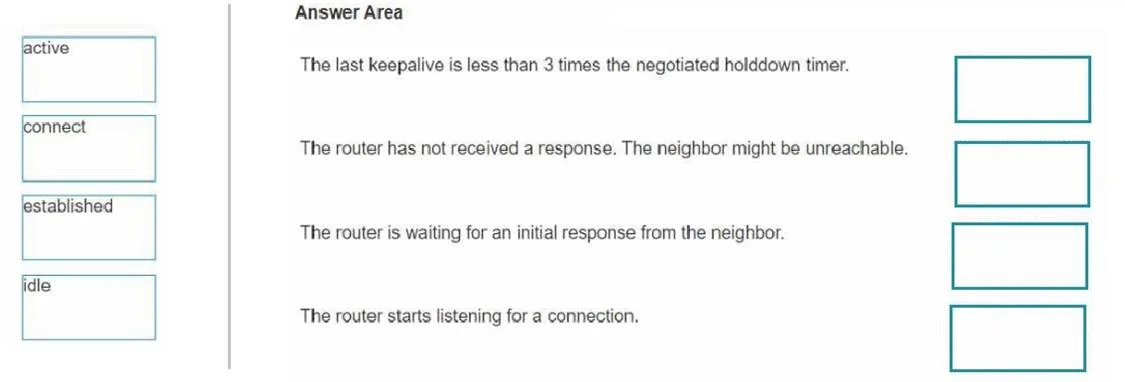
Drag and Drop Question Match the BGP connection states to the conditions that could have caused that state. Answer:
The correct answer is update; keepalive; notification; route refresh; open. BGP Message Types - Drag & Drop Explanation The question is asking you to match BGP message types to the conditions/scenarios that trigger them. The five BGP message types and their correct placements are: --- 1. update - Carries Routing Information Why it's #1: An UPDATE…
Question
Drag and Drop Question Match the BGP connection states to the conditions that could have caused that state. Answer:
Exhibit
Answer Area
Drag items
Correct arrangement
- update
- keepalive
- notification
- route refresh
- open
Explanation
BGP Message Types - Drag & Drop Explanation
The question is asking you to match BGP message types to the conditions/scenarios that trigger them. The five BGP message types and their correct placements are:
1. update - Carries Routing Information
Why it's #1: An UPDATE message is the primary vehicle for exchanging routing information. It advertises new prefixes (NLRI), withdraws unreachable routes, and carries path attributes (AS_PATH, NEXT_HOP, MED, etc.). This is the most functionally significant message - the core reason BGP exists.
Condition it maps to: A peer announces or withdraws network prefixes.
2. keepalive - Maintains the Session
Why it's #2: A KEEPALIVE is sent periodically (default every 60 seconds) to prevent the hold timer from expiring. It carries no routing data - it's purely a "I'm still here" signal. If a peer stops receiving KEEPALIVEs and the hold timer (default 180s) expires, the session drops.
Condition it maps to: Maintaining an established BGP session with no routing changes to send.
Common misconception: Students confuse KEEPALIVE with the hold timer value. KEEPALIVE is sent at 1/3 of the hold timer interval by default.
3. notification - Signals an Error / Tears Down the Session
Why it's #3: A NOTIFICATION message is sent when BGP detects an error (e.g., hold timer expiry, malformed message, configuration mismatch like mismatched AS numbers). After sending a NOTIFICATION, the peer immediately closes the TCP connection - there is no graceful goodbye.
Condition it maps to: An error is detected, or the session must be terminated.
Common misconception: Students think the session stays up after a NOTIFICATION. It does not - it's a hard reset.
4. route refresh - Requests Re-advertisement Without Session Reset
Why it's #4: ROUTE REFRESH (RFC 2918) allows a peer to request that its neighbor re-send its full routing table without tearing down and re-establishing the session. This is used after a policy change when you need to re-evaluate routes already received.
Condition it maps to: A routing policy change requires re-evaluation of received routes without resetting the session.
Common misconception: Students confuse this with a session reset. ROUTE REFRESH is specifically designed to avoid that disruption. It requires both peers to negotiate capability support during OPEN.
5. open - Initiates / Establishes the BGP Session
Why it's #5: The OPEN message is the first message exchanged after the TCP connection is established. It negotiates session parameters: BGP version, AS number, hold time, BGP Router ID, and optional capabilities (like route refresh, 4-byte ASN support). Both peers must exchange OPENs and respond with KEEPALIVEs before reaching the Established state.
Condition it maps to: Two BGP peers are forming a new session for the first time (or after a reset).
Common misconception: Students sometimes think OPEN happens after authentication. TCP completes first, then OPEN - BGP MD5 authentication is handled at the TCP layer, not inside the OPEN message itself.
Quick Reference Table
| # | Message | Trigger Condition |
|---|---|---|
| 1 | update | Prefix advertisement or withdrawal |
| 2 | keepalive | Session maintenance / hold timer reset |
| 3 | notification | Error detected, session teardown |
| 4 | route refresh | Policy change, request re-advertisement |
| 5 | open | New session establishment, parameter negotiation |
The arrangement roughly follows operational frequency (UPDATE and KEEPALIVE happen constantly in steady state) followed by error handling (NOTIFICATION) then maintenance tools (ROUTE REFRESH) then session setup (OPEN).
Topics
Community Discussion
No community discussion yet for this question.