
HPE7-A06 · Question #21
A customer has configured 802.1X authentication with MAC authentication fallback and is complaining that printers are not accessible with the new configuration below. You can see a successful entry…
Sign in or unlock HPE7-A06 to reveal the answer and full explanation for question #21. The question stem and answer options stay visible for context.
Question
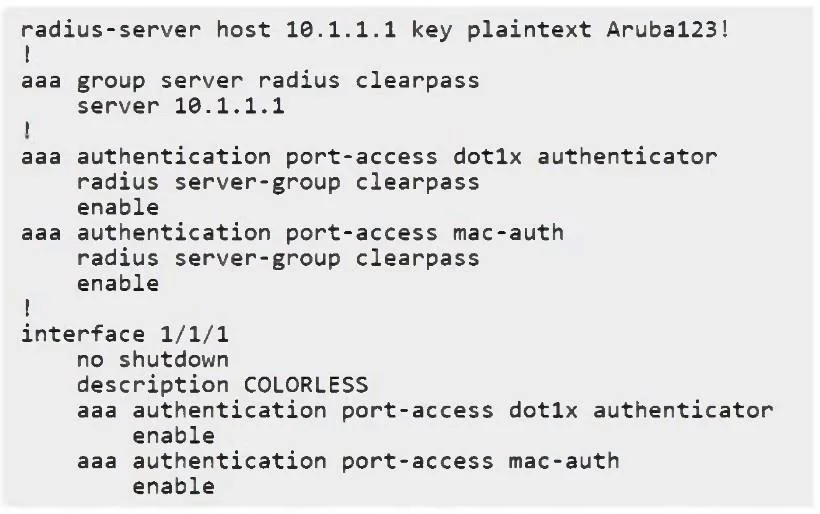
A customer has configured 802.1X authentication with MAC authentication fallback and is complaining that printers are not accessible with the new configuration below. You can see a successful entry in HPE Aruba Networking ClearPass Access Tracker assigning the correct user role and you have confirmed that the printer MAC address is being learned in the correct VLAN. However, the printer network settings show an IP address starting with 169.254. Which configuration change would you recommend to resolve the issue?
Exhibit
Options
- Ainterface 1/1/1
- Binterface 1/1/1
- Caaa authentication allow-fail-through
- Dinterface 1/1/1
Unlock HPE7-A06 to see the answer
You've previewed enough free HPE7-A06 questions. Unlock HPE7-A06 for full answers, explanations, the timed quiz mode, progress tracking, and the master PDF. Question stem and options stay visible so you can still see what's on the exam.