
HP
HPE7-A06 · Question #124
An IT administrator uses AOS-CX switches to send TCP 22 traffic from the switch port to a remote server to analysis. The administrator now wants to save it locally to be downloaded and used later in…
Sign in or unlock HPE7-A06 to reveal the answer and full explanation for question #124. The question stem and answer options stay visible for context.
Implementing Complex Campus Access Switching
Question
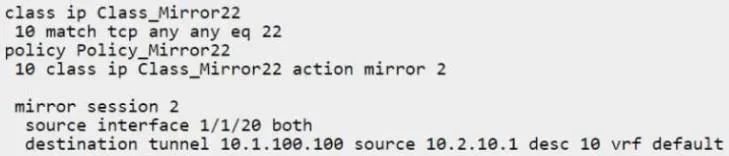
An IT administrator uses AOS-CX switches to send TCP 22 traffic from the switch port to a remote server to analysis. The administrator now wants to save it locally to be downloaded and used later in case the admin changes their mind about the approach to take.
Exhibit
Options
- Adestination file tshark-pcap
- Bdestination tunnel file tshark-pcpap
- Cdestination cpu
- Ddestination flash://my-mirror.pcpap policy Policy_Mirror22
Unlock HPE7-A06 to see the answer
You've previewed enough free HPE7-A06 questions. Unlock HPE7-A06 for full answers, explanations, the timed quiz mode, progress tracking, and the master PDF. Question stem and options stay visible so you can still see what's on the exam.
Topics
#traffic mirroring#packet capture#AOS-CX mirror session#local storage