
HP
HPE7-A06 · Question #123
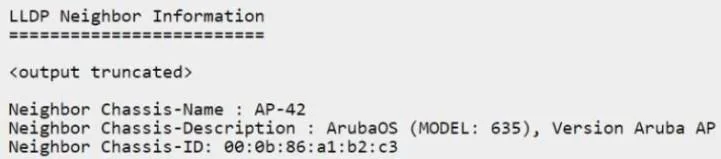
Which set of commands will apply the device profile 'AP' to the device shown in the LLDP neighbor output below? A. B. C. D.
Sign in or unlock HPE7-A06 to reveal the answer and full explanation for question #123. The question stem and answer options stay visible for context.
Implementing Complex Campus Access Switching
Question
Which set of commands will apply the device profile ‘AP’ to the device shown in the LLDP neighbor output below? A. B. C. D.
Exhibits
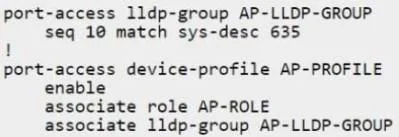
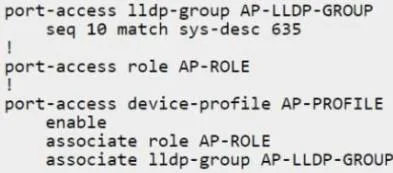
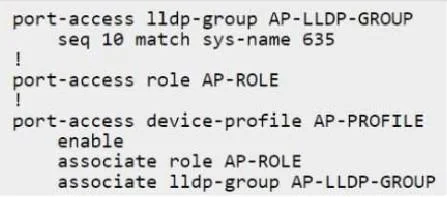
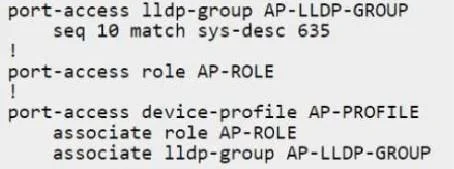
Options
- Aport-access lldp-group AP-LLDP-GROUP seq 10 match sys-desc 635 ! port-access device-profile AP-PROFILE enable associate role AP-ROLE associate lldp-group AP-LLDP-GROUP
- Bport-access lldp-group AP-LLDP-GROUP seq 10 match sys-name 635 ! port-access role AP-ROLE ! port-access device-profile AP-PROFILE enable associate role AP-ROLE associate lldp-group AP-LLDP-GROUP
- Cport-access lldp-group AP-LLDP-GROUP seq 10 match sys-desc 635 ! port-access role AP-ROLE ! port-access device-profile AP-PROFILE enable associate lldp-group AP-LLDP-GROUP
- Dport-access lldp-group AP-LLDP-GROUP seq 10 match sys-desc 635 ! port-access device-profile AP-PROFILE enable associate role AP-ROLE associate lldp-group AP-LLDP-GROUP
Unlock HPE7-A06 to see the answer
You've previewed enough free HPE7-A06 questions. Unlock HPE7-A06 for full answers, explanations, the timed quiz mode, progress tracking, and the master PDF. Question stem and options stay visible so you can still see what's on the exam.
Topics
#device profiles#LLDP neighbors#AOS-CX CLI#AP onboarding