
HPE7-A06 · Question #76
Drag and Drop Question Identify the required configuration steps to enable DHCP Endpoint Profiling with HPE Aruba Networking ClearPass. (Not all will be used) Answer:
The correct answer is Create a pre-authentication role and associate a VLAN.; Associate a policy to the role above allowing only UDP port 67.; Configure the pre-authentication role on the client-facing interface.; Configure ClearPass as an additional IP helper for the profiling VLAN SVI. DHCP Endpoint Profiling with ClearPass - Explained Background ClearPass profiles endpoints by inspecting DHCP packets (option fields like Option 55, Option 60, hostname, etc.) before full authentication. To do this, the switch must forward DHCP broadcasts from unauthenticated…
Question
Drag and Drop Question Identify the required configuration steps to enable DHCP Endpoint Profiling with HPE Aruba Networking ClearPass. (Not all will be used) Answer:
Exhibit
Answer Area
Drag items
Correct arrangement
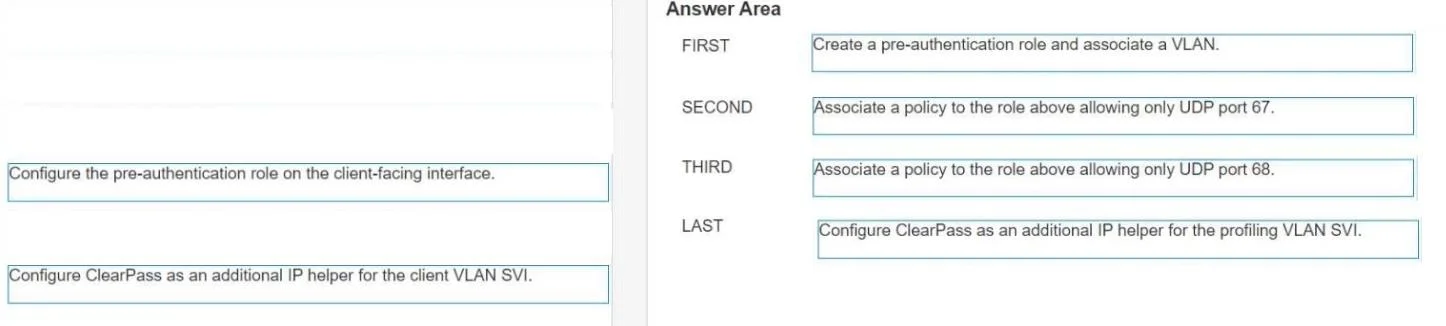
- Create a pre-authentication role and associate a VLAN.
- Associate a policy to the role above allowing only UDP port 67.
- Configure the pre-authentication role on the client-facing interface.
- Configure ClearPass as an additional IP helper for the profiling VLAN SVI.
Explanation
DHCP Endpoint Profiling with ClearPass - Explained
Background
ClearPass profiles endpoints by inspecting DHCP packets (option fields like Option 55, Option 60, hostname, etc.) before full authentication. To do this, the switch must forward DHCP broadcasts from unauthenticated clients to ClearPass. The four steps build this pipeline in a strict logical dependency order.
Step-by-Step Breakdown
Step 1: Create a pre-authentication role and associate a VLAN.
This is the mandatory foundation. Before any policy can reference a role, and before any interface can apply one, the role must exist. The associated VLAN isolates unauthenticated clients into a "holding" segment - this is what you'll later call the profiling VLAN. Nothing downstream is possible without this object existing first.
Step 2: Associate a policy to the role above allowing only UDP port 67.
With the role created, you immediately restrict what pre-auth clients can do. The policy permits only UDP port 67 - the DHCP server port. Here's why port 67, not 68:
- Clients send DHCP Discover/Request packets from port 68 to port 67
- The ACL controls what the client is allowed to reach, i.e., the destination port
- Allowing UDP port 67 lets clients send DHCP requests; nothing else passes
Common mistake: Choosing port 68 instead. Port 68 is the client's source port - permitting it in an outbound policy does not enable DHCP traffic to flow toward a server and would leave ClearPass unable to receive DHCP packets.
Step 3: Configure the pre-authentication role on the client-facing interface.
Now that the role and its policy are fully defined, you apply the role to the switch port (or interface) where clients connect. This tells the switch: "Any unauthenticated device on this port gets the pre-auth role." The ordering is strict - you cannot apply a role that doesn't exist, and a role without its policy is incomplete.
Step 4: Configure ClearPass as an additional IP helper for the profiling VLAN SVI.
The final piece: configure DHCP relay on the Layer 3 SVI of the profiling VLAN (the pre-auth VLAN from Step 1) to also unicast DHCP broadcasts to ClearPass's IP address. "Additional" means the real DHCP server still handles addressing; ClearPass just receives a copy for inspection.
Common mistake: Adding the IP helper to the client VLAN SVI instead. The client VLAN is where devices land after authentication - too late to profile them. ClearPass must see the DHCP traffic before auth, which happens on the profiling VLAN.
Why the Two Unused Items Are Wrong
| Unused Item | Why It's Wrong |
|---|---|
| Allow only UDP port 68 | Port 68 is the client source port, not the destination - this policy would not enable DHCP request forwarding |
| IP helper on client VLAN SVI | Clients are already authenticated and assigned by the time they're on this VLAN; profiling opportunity has passed |
Summary of Logical Flow
Role + VLAN defined → Policy attached to role → Role applied to interface → ClearPass receives DHCP via relay
Each step depends on the previous one existing. The entire chain exists to ensure unauthenticated clients can send DHCP, and ClearPass can see those packets to fingerprint the device before the authentication decision is made.
Topics
Community Discussion
No community discussion yet for this question.