HPE7-A06 · Question #69
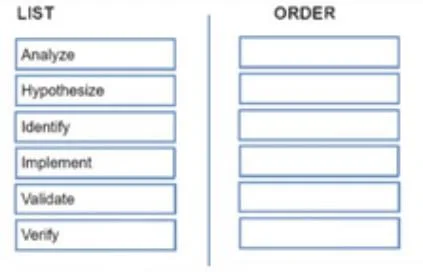
Drag and Drop Question Place the steps in sequence. What is the order of the recommended steps to troubleshoot an issue? Answer:
The correct answer is Identify; Analyze; Hypothesize; Implement; Verify; Validate. Troubleshooting Methodology: Step-by-Step Breakdown This follows the standard structured troubleshooting process used in IT, networking, and systems administration (aligned with frameworks like CompTIA's troubleshooting model). --- The Correct Order & Why 1. Identify > "What is…
Question
Exhibit
Answer Area
Drag items
Correct arrangement
- Identify
- Analyze
- Hypothesize
- Implement
- Verify
- Validate
Explanation
Troubleshooting Methodology: Step-by-Step Breakdown
This follows the standard structured troubleshooting process used in IT, networking, and systems administration (aligned with frameworks like CompTIA's troubleshooting model).
The Correct Order & Why
1. Identify
"What is the problem?"
You must first define the problem before anything else. This means gathering information: talking to users, reviewing symptoms, reproducing the issue, and establishing what "normal" looks like vs. what's broken. Without a clear problem statement, every subsequent step is guesswork.
2. Analyze
"What do we know about this problem?"
Once identified, you dig deeper - examine logs, error messages, recent changes, affected scope, and patterns. Analysis transforms raw symptoms into structured data. You are not guessing yet; you are building evidence.
3. Hypothesize
"What do we think is causing it?"
Using your analysis, you form one or more candidate root causes. This is your educated guess, ranked by likelihood. Only after analyzing the evidence can you form a meaningful hypothesis - hypothesizing before analyzing leads to shooting in the dark.
4. Implement
"Apply the fix."
Execute your chosen solution based on the hypothesis. This step should be deliberate and, where possible, change one thing at a time so you can attribute results accurately.
5. Verify
"Did the fix work?"
Immediately after implementing, test whether the specific problem is resolved. This is a direct technical check - does the symptom still occur? This is narrowly scoped to the original issue.
6. Validate
"Did we break anything else, and is the system fully healthy?"
The final step is broader: confirm the overall system is functioning normally, no side effects were introduced, and the fix holds under normal operating conditions. Validation is the "big picture" check after the targeted verification.
Common Mistakes & Misconceptions
| Mistake | Why It's Wrong |
|---|---|
| Skipping Analyze and jumping to Hypothesize | Hypotheses without evidence are guesses; analysis is what makes them informed. |
| Swapping Verify and Validate | Verify = "did my fix work?" (narrow). Validate = "is everything okay?" (broad). Validate always comes last. |
| Implementing before Hypothesizing | Randomly applying fixes wastes time and can introduce new problems. |
| Treating Identify and Analyze as the same step | Identify is what is wrong; Analyze is understanding what's wrong - they are distinct phases. |
Memory Aid
I A H I V V - "I Always Have Issues Very Visibly" Identify → Analyze → Hypothesize → Implement → Verify → Validate
Topics
Community Discussion
No community discussion yet for this question.