
DP-300 · Question #61
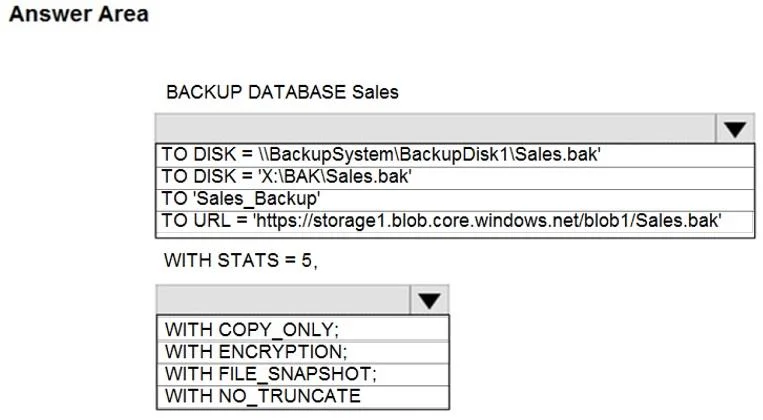
Hotspot Question You have an Azure SQL Database managed instance named sqldbmi1 that contains a database name Sales. You need to initiate a backup of Sales. How should you complete the Transact-SQL…
The correct answer is BACKUP DATABASE Sales: TO URL = 'https://storage1.blob.core.windows.net/blob1/Sales.bak'; WITH STATS = 5,: WITH COPY_ONLY. This question tests knowledge of how to initiate an ad-hoc copy-only backup in Azure SQL Managed Instance using T-SQL, which has specific syntax requirements compared to on-premises SQL Server.
Question
Exhibit
Answer Area
- BACKUP DATABASE SalesTO URL = 'https://storage1.blob.core.windows.net/blob1/Sales.bak'TO DISK = '\\BackupSystem\\BackupDisk1\\Sales.bak'TO DISK = 'X:\\BAK\\Sales.bak'TO 'Sales_Backup'TO URL = 'https://storage1.blob.core.windows.net/blob1/Sales.bak'
- WITH STATS = 5,WITH COPY_ONLY;WITH COPY_ONLY;WITH ENCRYPTION;WITH FILE_SNAPSHOT;WITH NO_TRUNCATE
Explanation
This question tests knowledge of how to initiate an ad-hoc copy-only backup in Azure SQL Managed Instance using T-SQL, which has specific syntax requirements compared to on-premises SQL Server.
Approach. In Azure SQL Managed Instance, you can perform manual backups using the BACKUP DATABASE command with the TO URL clause pointing to an Azure Blob Storage URL, and you must use the COPY_ONLY option since Managed Instance manages its own automated backups. The correct T-SQL statement is: BACKUP DATABASE Sales TO URL = 'https://<storage_account>.blob.core.windows.net/<container>/Sales.bak' WITH COPY_ONLY. The COPY_ONLY keyword is mandatory in Managed Instance because it ensures the manual backup does not interfere with the automated backup chain managed by Azure. Without COPY_ONLY, the command will fail on a Managed Instance.
Concept tested. Azure SQL Managed Instance backup capabilities - specifically using BACKUP DATABASE ... TO URL ... WITH COPY_ONLY T-SQL syntax, which is the only supported manual backup method in Azure SQL Managed Instance, as traditional BACKUP TO DISK is not supported in this PaaS environment.
Reference. https://docs.microsoft.com/en-us/azure/azure-sql/managed-instance/backup-activity-monitor
Topics
Community Discussion
No community discussion yet for this question.