
DP-300 · Question #60
Hotspot Question You have SQL Server on an Azure virtual machine that contains a database named DB1. The database reports a CHECKSUM error. You need to recover the database. How should you complete…
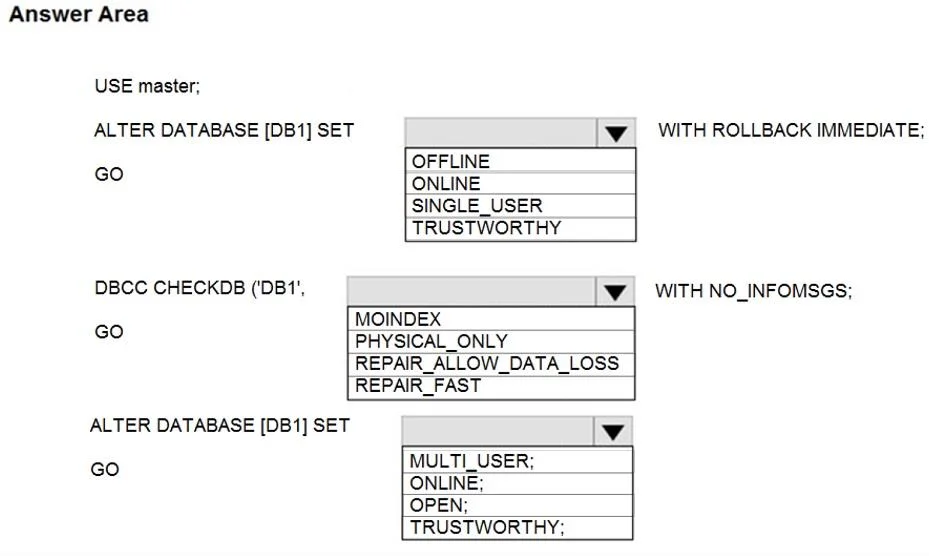
The correct answer is ALTER DATABASE [DB1] SET ... WITH ROLLBACK IMMEDIATE;: SINGLE_USER; DBCC CHECKDB ('DB1', ... WITH NO_INFOMSGS;: REPAIR_ALLOW_DATA_LOSS; ALTER DATABASE [DB1] SET ...: ONLINE. This question tests knowledge of SQL Server database recovery from a CHECKSUM error using DBCC CHECKDB and RESTORE commands with appropriate repair options.
Question
Exhibit
Answer Area
- ALTER DATABASE [DB1] SET ... WITH ROLLBACK IMMEDIATE;SINGLE_USEROFFLINEONLINESINGLE_USERTRUSTWORTHY
- DBCC CHECKDB ('DB1', ... WITH NO_INFOMSGS;REPAIR_ALLOW_DATA_LOSSMOINDEXPHYSICAL_ONLYREPAIR_ALLOW_DATA_LOSSREPAIR_FAST
- ALTER DATABASE [DB1] SET ...ONLINE;MULTI_USER;ONLINE;OPEN;TRUSTWORTHY;
Explanation
This question tests knowledge of SQL Server database recovery from a CHECKSUM error using DBCC CHECKDB and RESTORE commands with appropriate repair options.
Approach. To recover from a CHECKSUM error in SQL Server, you first run DBCC CHECKDB('DB1') to assess the damage and determine the minimum repair level needed. If repair is possible without data loss, you use ALTER DATABASE DB1 SET SINGLE_USER to put the database in single-user mode, then run DBCC CHECKDB('DB1', REPAIR_REBUILD) for non-data-loss repairs or DBCC CHECKDB('DB1', REPAIR_ALLOW_DATA_LOSS) if data loss is acceptable. After repair, you restore multi-user access with ALTER DATABASE DB1 SET MULTI_USER. If backup restoration is preferred, you use RESTORE DATABASE DB1 FROM DISK with the WITH RECOVERY option to bring the database online after restoring the most recent clean backup.
Concept tested. SQL Server database integrity, CHECKSUM error recovery using DBCC CHECKDB with repair options (REPAIR_REBUILD or REPAIR_ALLOW_DATA_LOSS), and proper database mode management (SINGLE_USER/MULTI_USER) during repair operations on Azure VMs.
Reference. https://docs.microsoft.com/en-us/sql/t-sql/database-console-commands/dbcc-checkdb-transact-sql
Topics
Community Discussion
No community discussion yet for this question.