
DP-300 · Question #420
Hotspot Question You have a SQL Server on Azure Virtual Machines instance named SQLVM1 that contains two databases named DB1 and DB2. The database and log files for DB1 and DB2 are hosted on managed…
The correct answer is ALTER ... CONFIGURATION: SERVER; WITH ..., FORMAT;: FILE_SNAPSHOT. To perform a snapshot backup of SQL Server databases on Azure managed disks, you must alter the database configuration to suspend writes for snapshot backup and then execute a BACKUP command with the FILE_SNAPSHOT option.
Question
Exhibit
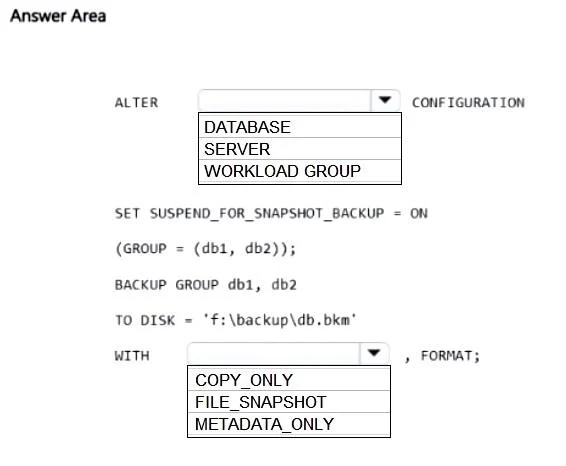
Answer Area
- ALTER ... CONFIGURATIONSERVERDATABASESERVERWORKLOAD GROUP
- WITH ..., FORMAT;FILE_SNAPSHOTCOPY_ONLYFILE_SNAPSHOTMETADATA_ONLY
Explanation
To perform a snapshot backup of SQL Server databases on Azure managed disks, you must alter the database configuration to suspend writes for snapshot backup and then execute a BACKUP command with the FILE_SNAPSHOT option.
Approach. The correct interaction is to select 'DATABASE' for the first dropdown and 'FILE_SNAPSHOT' for the second dropdown.
-
First Dropdown: ALTER DATABASE CONFIGURATION The
SUSPEND_FOR_SNAPSHOT_BACKUPoption is a database-level setting in SQL Server. It is used to temporarily suspend I/O operations for a specific database or a group of databases to ensure a consistent state before an underlying disk snapshot is taken by the host operating system or virtualization platform (in this case, Azure managed disks). Therefore, the correct keyword to completeALTER ___ CONFIGURATIONisDATABASE. -
Second Dropdown: WITH FILE_SNAPSHOT When performing a SQL Server File-Snapshot Backup against Azure managed disks, the
BACKUPcommand needs to use theFILE_SNAPSHOToption. This option tells SQL Server to register the metadata of the underlying storage snapshot (which contains the actual database files) as a backup. The actual.bkmfile created by this command is very small and only contains the metadata necessary to reconstruct the database from the disk snapshot, not the full database content. The problem statement explicitly asks for a 'snapshot backup', makingFILE_SNAPSHOTthe only appropriate choice.
Common mistakes.
- common_mistake. 1. Choosing 'SERVER' or 'WORKLOAD GROUP' for the first dropdown: The
SUSPEND_FOR_SNAPSHOT_BACKUPsetting is specifically applied at the database level to ensure transaction consistency for the chosen databases, not at the server level or for workload groups.
- Choosing 'COPY_ONLY' for the second dropdown:
COPY_ONLYis an option for standard SQL Server backups (full, differential, log) that ensures the backup does not break the normal backup chain. It is not related to performing a file-snapshot backup that leverages underlying storage snapshots. - Choosing 'METADATA_ONLY' for the second dropdown: While a file-snapshot backup essentially produces a metadata-only backup file from SQL Server's perspective, the specific T-SQL keyword to enable this feature for Azure managed disk snapshots is
FILE_SNAPSHOT. TheMETADATA_ONLYoption forBACKUPis not the correct syntax for initiating a file-snapshot backup.METADATA_ONLYis more commonly seen withRESTOREcommands to view backup set information without actually restoring data.
Concept tested. SQL Server File-Snapshot Backups on Azure Virtual Machines using managed disks. This includes understanding the ALTER DATABASE ... SET SUSPEND_FOR_SNAPSHOT_BACKUP command and the BACKUP DATABASE ... WITH FILE_SNAPSHOT option for creating application-consistent backups leveraging underlying cloud platform disk snapshot capabilities.
Topics
Community Discussion
No community discussion yet for this question.