
DP-300 · Question #367
Hotspot Question You have an Azure subscription that contains a storage account named databasebackups. You have an Azure SQL managed instance named DB1. You need to back up DB1 to databasebackups…
The correct answer is WITH IDENTITY =: 'SHARED ACCESS SIGNATURE'; WITH: COMPRESSION. This question tests your knowledge of backing up an Azure SQL Managed Instance database to an Azure Blob Storage account using T-SQL BACKUP DATABASE commands with a SAS credential.
Question
Exhibit
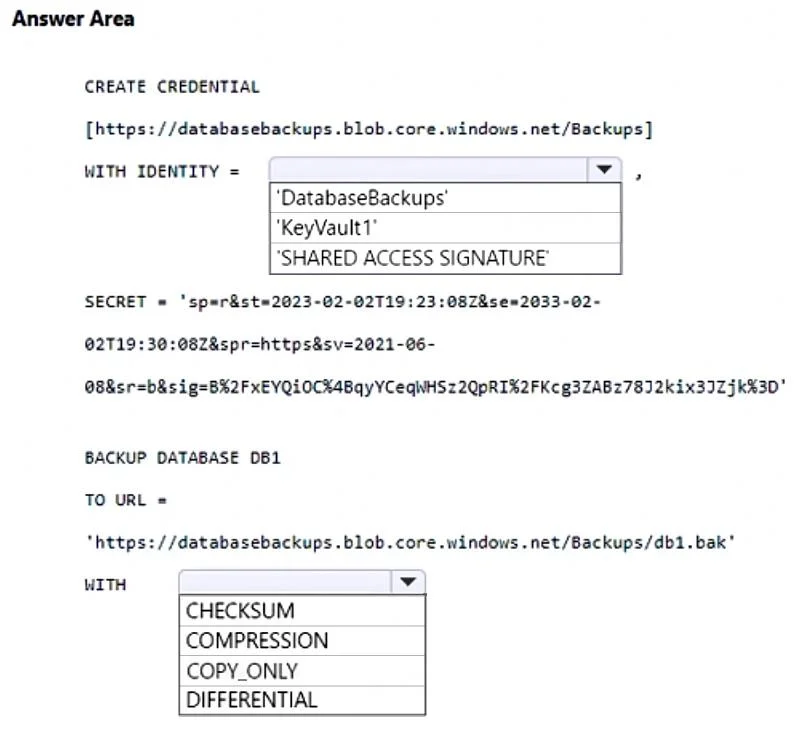
Answer Area
- WITH IDENTITY ='SHARED ACCESS SIGNATURE''DatabaseBackups''KeyVault1''SHARED ACCESS SIGNATURE'
- WITHCOMPRESSIONCHECKSUMCOMPRESSIONCOPY_ONLYDIFFERENTIAL
Explanation
This question tests your knowledge of backing up an Azure SQL Managed Instance database to an Azure Blob Storage account using T-SQL BACKUP DATABASE commands with a SAS credential.
Approach. To back up an Azure SQL Managed Instance to Azure Blob Storage, you must first create a credential using CREATE CREDENTIAL with the storage account URL and a SAS token as the secret. Then you execute BACKUP DATABASE [DB1] TO URL = 'https://databasebackups.blob.core.windows.net/container/DB1.bak' WITH CREDENTIAL = 'credential_name', FORMAT. The key steps are: (1) Create a SAS token on the storage account, (2) Use CREATE CREDENTIAL in SQL MI pointing to the storage URL with the SAS token as the SECRET, (3) Run BACKUP DATABASE TO URL referencing that credential. This is the supported method because Azure SQL Managed Instance does not support traditional backup to local disk paths - only URL-based backups to Azure Blob Storage are supported.
Concept tested. Backing up Azure SQL Managed Instance to Azure Blob Storage using T-SQL BACKUP TO URL with SAS-based credentials, including the correct syntax for CREATE CREDENTIAL and BACKUP DATABASE TO URL commands.
Reference. https://learn.microsoft.com/en-us/azure/azure-sql/managed-instance/backup-restore-overview
Topics
Community Discussion
No community discussion yet for this question.