
DP-300 · Question #235
Hotspot Question You have an Azure SQL database named DB1. You need to identify how much unused space in megabytes was allocated to DB1. How should you complete the Transact-SQL query? To answer…
The correct answer is SELECT SUM(size/: 128.0; FROM: sys.database_files. To calculate unused space in an Azure SQL database, select '128.0' for the page-to-MB conversion and 'sys.database_files' as the source for file size information.
Question
Exhibit
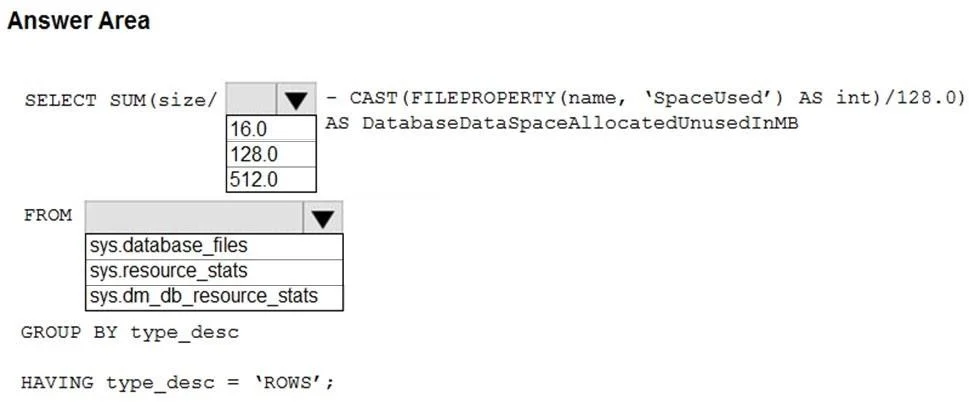
Answer Area
- SELECT SUM(size/128.016.0128.0512.0
- FROMsys.database_filessys.database_filessys.resource_statssys.dm_db_resource_stats
Explanation
To calculate unused space in an Azure SQL database, select '128.0' for the page-to-MB conversion and 'sys.database_files' as the source for file size information.
Approach. The question asks to identify unused allocated space in an Azure SQL database in megabytes. The formula for this is (Total Allocated Space in MB) - (Total Used Space in MB).
-
First Dropdown (Divisor): The
sizecolumn, typically found insys.database_files, represents the allocated space in 8-KB pages. To convert pages to megabytes, we need to divide by the number of 8-KB pages in a megabyte. Since 1 MB = 1024 KB and 1 page = 8 KB, then 1 MB = 1024 KB / 8 KB/page = 128 pages. Therefore,SUM(size)must be divided by128.0to convert total allocated pages to megabytes. TheCAST(FILEPROPERTY(name, 'SpaceUsed') AS int)/128.0part already correctly converts used pages to MB, so consistency dictates the allocated size also be divided by128.0.- Correct Selection: 128.0
-
Second Dropdown (FROM clause): We need a system view that provides information about database files, specifically their
name,size(allocated pages), andtype_desc.sys.database_filesis the correct system catalog view for this purpose. It contains a row for each data or log file and includes columns likename,size(in 8-KB pages), andtype_desc(e.g., 'ROWS' for data files, 'LOG' for log files), which is used in theGROUP BYandHAVINGclauses.- Correct Selection: sys.database_files
Thus, the complete query correctly calculates allocated space in MB minus used space in MB for data files.
Common mistakes.
- common_mistake. 1. Selecting 16.0 or 512.0 as the divisor: These values are incorrect for converting 8-KB pages to MB. 1 MB is equivalent to 128 8-KB pages, not 16 or 512. This mistake indicates a lack of understanding of SQL Server page size and unit conversion for storage.
- Selecting
sys.resource_statsorsys.dm_db_resource_statsfor the FROM clause: These dynamic management views (DMVs) provide resource utilization statistics (CPU, I/O, memory) for an Azure SQL Database. They do not contain details about database file allocation or individual file sizes (size,name,type_desc). This mistake shows confusion between performance monitoring views and database file configuration views.
Concept tested. Understanding of Transact-SQL system views and functions for monitoring Azure SQL Database storage, specifically calculating allocated vs. used space, knowledge of SQL Server page architecture (8-KB page size), and unit conversion between pages and megabytes.
Topics
Community Discussion
No community discussion yet for this question.