
DP-300 · Question #234
Hotspot Question You have a SQL Server on Azure Virtual Machines instance that hosts a 10-TB SQL database named DB1. You need to identify and repair any physical or logical corruption in DB1. The…
The correct answer is Option after DBCC CHECK [DB1],: REPAIR_REBUILD; Option after ) WITH: EXTENDED_LOGICAL_CHECKS. This question tests knowledge of DBCC CHECKDB repair options in SQL Server, specifically which repair level minimizes data loss while completing the corruption repair procedure efficiently on a large 10-TB database.
Question
Exhibit
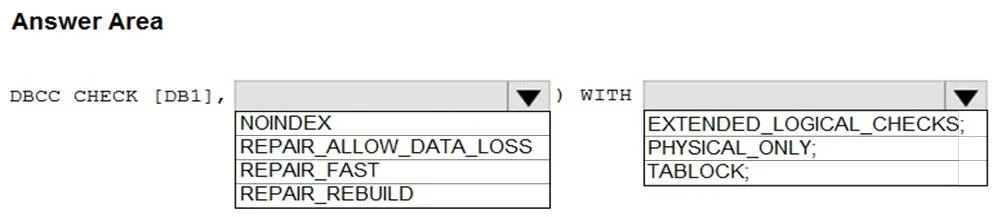
Answer Area
- Option after DBCC CHECK [DB1],REPAIR_REBUILDNOINDEXREPAIR_ALLOW_DATA_LOSSREPAIR_FASTREPAIR_REBUILD
- Option after ) WITHEXTENDED_LOGICAL_CHECKS;EXTENDED_LOGICAL_CHECKS;PHYSICAL_ONLY;TABLOCK;
Explanation
This question tests knowledge of DBCC CHECKDB repair options in SQL Server, specifically which repair level minimizes data loss while completing the corruption repair procedure efficiently on a large 10-TB database.
Approach. The correct command is DBCC CHECKDB (DB1, REPAIR_REBUILD). REPAIR_REBUILD performs all repairs that REPAIR_FAST does plus repairs requiring index rebuilds, with no possibility of data loss - making it ideal when the requirement is to minimize data loss. To minimize duration on a 10-TB database, the database should be set to SINGLE_USER mode before running the command (ALTER DATABASE DB1 SET SINGLE_USER WITH ROLLBACK IMMEDIATE), which prevents other connections from interfering and speeds up the process. REPAIR_ALLOW_DATA_LOSS is avoided because, despite being the only option that can fix certain severe corruptions, it may delete pages or rows to resolve issues, violating the minimize-data-loss requirement.
Concept tested. DBCC CHECKDB repair options: REPAIR_FAST (no repairs, deprecated), REPAIR_REBUILD (lossless repairs including index rebuilds), and REPAIR_ALLOW_DATA_LOSS (may delete corrupted data). The correct repair level choice balances completeness with data preservation, and SINGLE_USER mode is required before running any REPAIR option.
Reference. https://learn.microsoft.com/en-us/sql/t-sql/database-console-commands/dbcc-checkdb-transact-sql
Topics
Community Discussion
No community discussion yet for this question.