
DP-300 · Question #454
Hotspot Question You have an on-premises server named Server1 that has Microsoft SQL Server 2022 installed. You need to define an extended event to track user connections to Server1. The solution…
The correct answer is ADD EVENT (first instance): sqlserver.login; ADD EVENT (second instance): sqlserver.session_fedauth_failure. This question tests knowledge of SQL Server Extended Events (XEvents) syntax for tracking user connection attempts, specifically targeting the correct event package, event name, and session options.
Question
Exhibit
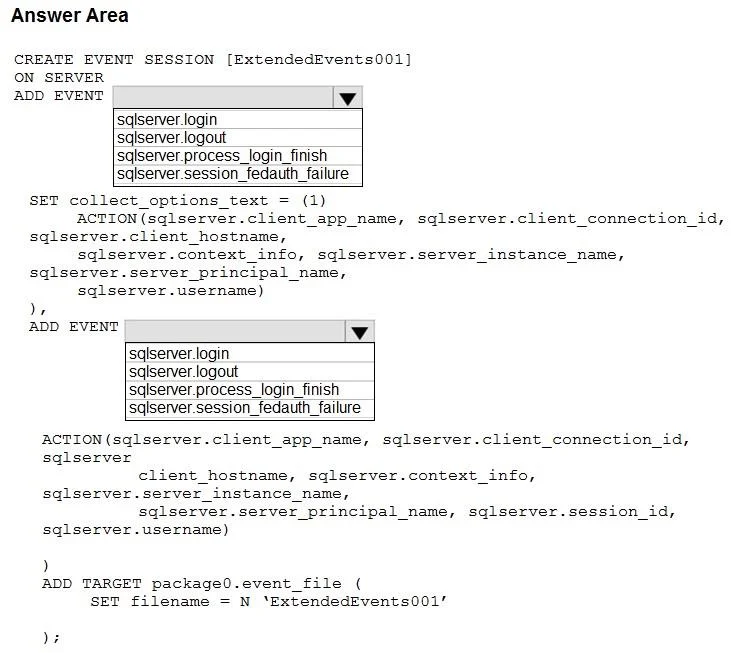
Answer Area
- ADD EVENT (first instance)sqlserver.loginsqlserver.loginsqlserver.logoutsqlserver.process_login_finishsqlserver.session_fedauth_failure
- ADD EVENT (second instance)sqlserver.session_fedauth_failuresqlserver.loginsqlserver.logoutsqlserver.process_login_finishsqlserver.session_fedauth_failure
Explanation
This question tests knowledge of SQL Server Extended Events (XEvents) syntax for tracking user connection attempts, specifically targeting the correct event package, event name, and session options.
Approach. To track ALL connection attempts (both successful and failed), you should use the event 'sqlserver.connectivity_ring_buffer_recorded' or more specifically 'sqlserver.login' event from the 'sqlserver' package. The correct query structure uses CREATE EVENT SESSION with ADD EVENT sqlserver.login (which captures all login attempts including failures). The session should be created with ADD TARGET package0.ring_buffer or package0.event_file, and started with ALTER EVENT SESSION ... ON SERVER STATE = START. Using 'sqlserver.login' captures all connection attempts whereas 'sqlserver.sql_statement_completed' would only capture successful query executions. The DROP option or IF EXISTS handling ensures idempotency, and STATE = START ensures the session is actively collecting data.
Concept tested. SQL Server Extended Events (XEvents) - creating and configuring event sessions to monitor connectivity, specifically selecting the correct event name (sqlserver.login) from the correct package to capture all connection attempts including failed logins, and using proper DDL syntax for CREATE EVENT SESSION with correct TARGET and session options.
Topics
Community Discussion
No community discussion yet for this question.