
DP-300 · Question #247
Hotspot Question You have an Azure subscription that is linked to an Azure Active Directory (Azure AD) tenant named contoso.com The subscription contains an Azure SQL database named SQL1 and an…
The correct answer is CREATE USER: [[email protected]]; FROM: EXTERNAL PROVIDER. This question tests your knowledge of creating an Azure AD-based database user in Azure SQL for a managed identity (app1). The correct T-SQL statement must use the FROM EXTERNAL PROVIDER clause to create an external (Azure AD) user.
Question
Exhibits
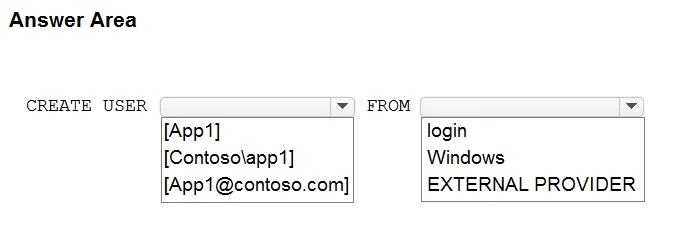
Answer Area
- CREATE USER[[email protected]]
- FROMEXTERNAL PROVIDERloginWindowsEXTERNAL PROVIDER
Explanation
This question tests your knowledge of creating an Azure AD-based database user in Azure SQL for a managed identity (app1). The correct T-SQL statement must use the FROM EXTERNAL PROVIDER clause to create an external (Azure AD) user.
Approach. The correct T-SQL statement is: CREATE USER [app1] FROM EXTERNAL PROVIDER. The keyword 'FROM EXTERNAL PROVIDER' tells Azure SQL Database that the user account is sourced from Azure Active Directory (not a SQL login), which is required for managed identities and Azure AD users. The user name must match the name of the app service/managed identity (app1). You do NOT use 'WITH PASSWORD' because managed identities authenticate via Azure AD tokens, not passwords. This enables app1 to authenticate to SQL1 using its system-assigned or user-assigned managed identity without storing credentials.
Concept tested. Creating Azure AD external users in Azure SQL Database using T-SQL, specifically using 'CREATE USER [<managed-identity-name>] FROM EXTERNAL PROVIDER' to allow an Azure App Service with a managed identity to authenticate to Azure SQL without credentials.
Topics
Community Discussion
No community discussion yet for this question.