
D-SNC-DY-00 · Question #18
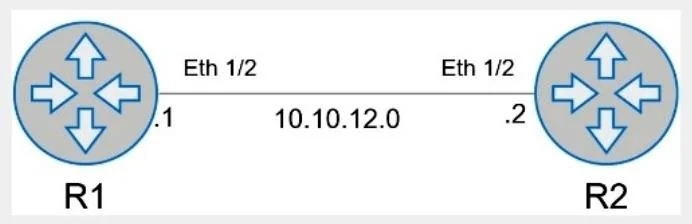
SIMULATION Configure the system to meet these requirements. - Configure R1 with AS 1. - R1 must use a static neighbor assignment for BGP peering. - R1 needs to redistribute all current and future…
The correct answer is A. Enter BGP Configuration Mode: R1# configure terminal R1(config)# router bgp 1 Configure the BGP Neighbor: R1(config-router) R1(config-router)# neighbor 10.10.12.2 remote-as 2 Redistribute Connected Routes into BGP: R1(config-router)# redistribute connected Exit BGP Configuration Mode and Save the Configuration: R1(config-router)# end R1# write memory. Option A correctly satisfies all three requirements: router bgp 1 places R1 in AS 1, neighbor 10.10.12.2 remote-as 2 creates a static (explicitly defined) peer relationship with R2's IP address in AS 2, and redistribute connected injects all directly connected interfaces - both…
Question
SIMULATION Configure the system to meet these requirements.
- Configure R1 with AS 1.
- R1 must use a static neighbor assignment for BGP peering.
- R1 needs to redistribute all current and future connected IPv4
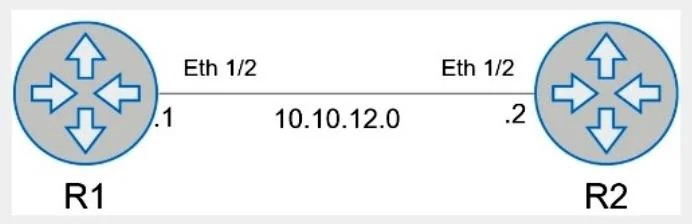
routes. All the required BGP configurations have already been completed on R2. R2 resides in BGP AS 2. When you have finished, continue to the next question. Answer:
Enter BGP Configuration Mode:
R1# configure terminal R1(config)# router bgp 1 Configure the BGP Neighbor:
R1(config-router)# neighbor 10.10.12.2 remote-as 2 Redistribute Connected Routes into BGP:
R1(config-router)# redistribute connected Exit BGP Configuration Mode and Save the Configuration:
R1(config-router)# end R1# write memory
Exhibits
Options
- AEnter BGP Configuration Mode: R1# configure terminal R1(config)# router bgp 1 Configure the BGP Neighbor: R1(config-router) R1(config-router)# neighbor 10.10.12.2 remote-as 2 Redistribute Connected Routes into BGP: R1(config-router)# redistribute connected Exit BGP Configuration Mode and Save the Configuration: R1(config-router)# end R1# write memory
How the community answered
(18 responses)- A100% (18)
Explanation
Option A correctly satisfies all three requirements: router bgp 1 places R1 in AS 1, neighbor 10.10.12.2 remote-as 2 creates a static (explicitly defined) peer relationship with R2's IP address in AS 2, and redistribute connected injects all directly connected interfaces - both current and future - into the BGP table automatically. Since this is a single-choice simulation question with only one option presented, there are no distractors to eliminate; the task is purely recognizing that the command sequence is complete and correctly ordered. Note that redistribute connected is the key differentiator here - using a network statement instead would require manually adding each prefix and would fail the "future connected routes" requirement.
Memory tip: Think of BGP setup in three steps - "AS, Neighbor, Redistribute" (ANR). You define your own AS number first, then point to your peer with their AS number, then decide what routes to share. If the question says "static neighbor," that means neighbor <ip> remote-as <num> - not dynamic peering or BGP listen.
Topics
Community Discussion
No community discussion yet for this question.