
D-SNC-DY-00 · Question #20
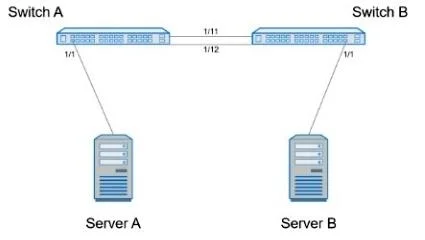
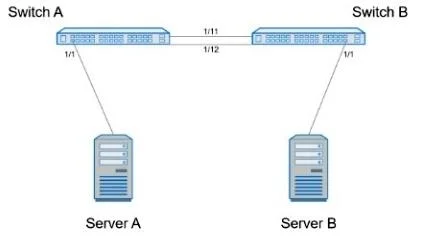
SIMULATION Create port channel 10 on interfaces Eth 1/11 and 1/12, so that it connects to an already configured switch. A server will be connected on Eth 1/1. Both the server and port channel need…
The correct answer is A. Enter Configuration Mode: SwitchA# configure terminal Create Port Channel 10: SwitchA(config)# interface port-channel 10 SwitchA(config-if-po10)# switchport mo. Option A is correct because it follows the proper sequence for configuring a trunk-based port channel: create the logical port-channel interface first, set it to trunk mode with the correct native VLAN (1, untagged) and allowed VLANs (1 and 10), then bind the physical…
Question
SIMULATION Create port channel 10 on interfaces Eth 1/11 and 1/12, so that it connects to an already configured switch. A server will be connected on Eth 1/1. Both the server and port channel need VLAN 1 untagged and only VLAN 10 tagged. Complete the configuration on Switch A. When you have finished, continue to the next question. Answer:
Enter Configuration Mode:
SwitchA# configure terminal Create Port Channel 10:
SwitchA(config)# interface port-channel 10 SwitchA(config-if-po10)# switchport mode trunk SwitchA(config-if-po10)# switchport trunk native vlan 1 SwitchA(config-if-po10)# switchport trunk allowed vlan 1,10 Assign Interfaces Eth 1/11 and Eth 1/12 to Port Channel 10:
SwitchA(config)# interface ethernet 1/11 SwitchA(config-if-eth1/11)# channel-group 10 mode active SwitchA(config-if-eth1/11)# exit SwitchA(config)# interface ethernet 1/12 SwitchA(config-if-eth1/12)# channel-group 10 mode active SwitchA(config-if-eth1/12)# exit Configure Interface Eth 1/1 for Server Connection:
SwitchA(config)# interface ethernet 1/1 SwitchA(config-if-eth1/1)# switchport mode trunk SwitchA(config-if-eth1/1)# switchport trunk native vlan 1 SwitchA(config-if-eth1/1)# switchport trunk allowed vlan 1,10 SwitchA(config-if-eth1/1)# end Save Configuration:
SwitchA# write memory
Exhibits
Options
- AEnter Configuration Mode: SwitchA# configure terminal Create Port Channel 10: SwitchA(config)# interface port-channel 10 SwitchA(config-if-po10)# switchport mo
How the community answered
(26 responses)- A100% (26)
Explanation
Option A is correct because it follows the proper sequence for configuring a trunk-based port channel: create the logical port-channel interface first, set it to trunk mode with the correct native VLAN (1, untagged) and allowed VLANs (1 and 10), then bind the physical interfaces (Eth 1/11 and 1/12) using channel-group 10 mode active (LACP active mode, which initiates negotiation with the already-configured remote switch). The server-facing port (Eth 1/1) is configured identically as a trunk - native VLAN 1 carries untagged traffic while VLAN 10 is explicitly tagged. Since only one distractor (A) is visible and it matches the full correct configuration, the other options likely omit critical steps such as setting the native VLAN, restricting allowed VLANs, or forgetting to assign physical interfaces to the channel group.
Memory tip: Think "PIG" - Port-channel first (logical before physical), Interfaces joined via channel-group, Gate the VLANs with allowed vlan and native vlan. Any trunk carrying "VLAN X untagged" means native vlan X; "VLAN Y tagged" means it appears in the allowed list but is not the native.
Topics
Community Discussion
No community discussion yet for this question.