
D-SNC-DY-00 · Question #25
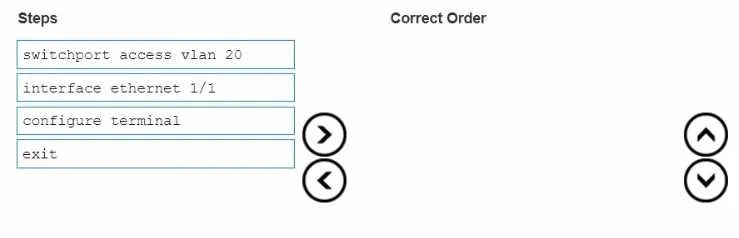
Drag and Drop Question In what order should these commands be entered to configure an access port in SONiC CLI if the required VLAN is already configured? Answer:
The correct answer is configure terminal; interface ethernet 1/1; switchport access vlan 20; exit. Configuring an Access Port in SONiC CLI SONiC uses a hierarchical CLI structure (similar to Cisco IOS), where you must enter progressively deeper configuration contexts before issuing interface-specific commands. --- The Correct Order & Why 1. configure terminal Moves the CLI…
Question
Drag and Drop Question In what order should these commands be entered to configure an access port in SONiC CLI if the required VLAN is already configured? Answer:
Exhibit
Answer Area
Drag items
Correct arrangement
- configure terminal
- interface ethernet 1/1
- switchport access vlan 20
- exit
Explanation
Configuring an Access Port in SONiC CLI
SONiC uses a hierarchical CLI structure (similar to Cisco IOS), where you must enter progressively deeper configuration contexts before issuing interface-specific commands.
The Correct Order & Why
1. configure terminal
Moves the CLI from EXEC mode into Global Configuration mode. Every configuration change in SONiC requires this first - it's the gateway to all config sub-modes. Without it, the subsequent commands are not recognized as configuration commands.
2. interface ethernet 1/1
From Global Config mode, this enters Interface Configuration mode for the specific port. You must specify which interface you're configuring before applying any port-level settings. The CLI context must be scoped to the interface before interface commands become valid.
3. switchport access vlan 20
Only valid inside Interface Configuration mode. This assigns the port to VLAN 20 as an untagged (access) port. Since the VLAN already exists (per the question), no VLAN creation step is needed - you're simply binding the interface to it. Attempting this command at Global Config level would fail.
4. exit
Returns the CLI one level up (back to Global Config or EXEC mode). This cleanly closes the interface context. While omitting it may not break the config, it's correct practice and expected in exam answers to show you've properly exited the sub-mode.
Common Mistakes
- Skipping
configure terminal- A frequent error. Users in EXEC mode will get "command not found" errors on all subsequent commands. - Jumping straight to
switchport- Without first entering the interface context, the CLI doesn't know which port to configure. - Reversing steps 2 and 3 - You cannot assign a VLAN to an interface before specifying which interface you're in. Context must precede configuration.
- Thinking
exitis optional - Technically the config may apply without it, but on exams it demonstrates awareness of CLI hierarchy and is considered correct form.
Topics
Community Discussion
No community discussion yet for this question.