
AZ-800 · Question #24
Drag and Drop Question You create a new Azure subscription. You plan to deploy Azure Active Directory Domain Services (Azure AD DS) and Azure virtual machines. The virtual machines will be joined to…
The correct answer is Create an Azure virtual network.; Create an Azure AD DS instance.; Modify the settings of the Azure virtual network. To deploy Azure AD DS for virtual machines, you must first create a virtual network, then deploy the Azure AD DS instance within that network, and finally configure the virtual network's DNS settings to point to the Azure AD DS domain controllers.
Question
Exhibit
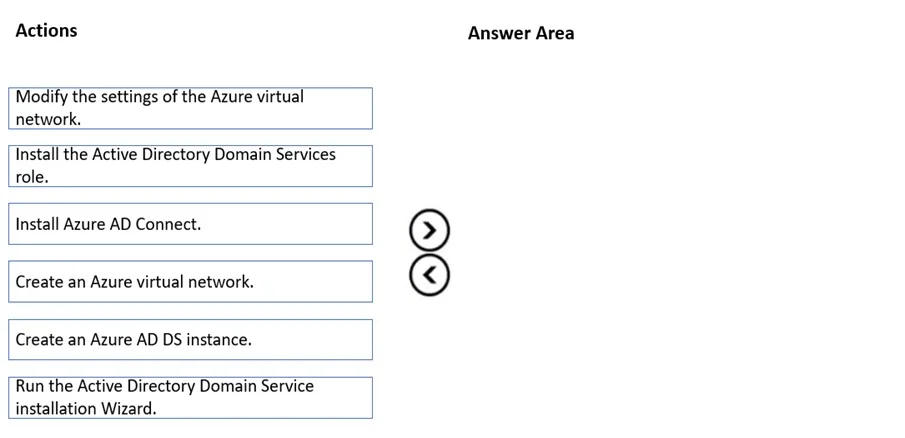
Answer Area
Drag items
Correct arrangement
- Create an Azure virtual network.
- Create an Azure AD DS instance.
- Modify the settings of the Azure virtual network.
Explanation
To deploy Azure AD DS for virtual machines, you must first create a virtual network, then deploy the Azure AD DS instance within that network, and finally configure the virtual network's DNS settings to point to the Azure AD DS domain controllers.
Approach. The correct interaction is to drag 'Create an Azure virtual network', 'Create an Azure AD DS instance', and 'Modify the settings of the Azure virtual network' into the answer area and arrange them in that specific sequence.
- Create an Azure virtual network: Azure Active Directory Domain Services (Azure AD DS) is a managed service that requires an existing Azure virtual network for its deployment. The managed domain controllers are deployed within a subnet of this VNet, providing network connectivity for virtual machines that will join the domain. This is a foundational prerequisite.
- Create an Azure AD DS instance: Once the virtual network is in place, the next step is to provision and enable the Azure AD DS managed domain. This process deploys two domain controllers (managed by Microsoft) into the designated subnet of the virtual network.
- Modify the settings of the Azure virtual network: After the Azure AD DS instance is deployed, it's crucial to ensure that virtual machines can resolve the domain name and communicate with the domain controllers. This requires updating the DNS server settings of the Azure virtual network (or specifically the subnets where VMs will reside) to point to the IP addresses of the Azure AD DS domain controllers. While Azure often automatically configures DNS within the AD DS subnet, explicitly modifying the VNet DNS settings is a necessary step to ensure all VMs within the VNet can use the managed domain.
Common mistakes.
- common_mistake. Other listed actions are incorrect because they apply to traditional Active Directory Domain Services (AD DS) deployed on Windows Server IaaS virtual machines, or to hybrid identity scenarios not central to the primary task of deploying Azure AD DS itself:
- 'Install the Active Directory Domain Services role' and 'Run the Active Directory Domain Service installation Wizard': These steps are for configuring AD DS on a self-managed Windows Server virtual machine, not for the managed Azure AD DS service.
- 'Install Azure AD Connect': Azure AD Connect is used for synchronizing identities between an on-premises Active Directory and Azure Active Directory. While related to Azure AD, it's not a prerequisite for deploying Azure AD DS itself, especially if the scenario implies a new subscription without an existing on-premises AD. Azure AD DS can be used with cloud-only user accounts directly from Azure AD.
Concept tested. Deployment process and prerequisites for Azure Active Directory Domain Services (Azure AD DS), including virtual network integration and DNS configuration for domain join.
Topics
Community Discussion
No community discussion yet for this question.