
AZ-800 · Question #234
SIMULATION You need to create an Active Directory Domain Services (AD DS) site named Site2 that is associated to an IP address range of 192.168.2.0 to 192.168.2.255. To complete this task, sign in…
The correct answer is C. Group Policy Objects (GPOs). This question is malformed, as the choices provided are unrelated to the initial task of creating an Active Directory site and subnet, instead focusing on various system management and policy tools. However, Group Policy Objects are central to managing AD environments.
Question
SIMULATION You need to create an Active Directory Domain Services (AD DS) site named Site2 that is associated to an IP address range of 192.168.2.0 to 192.168.2.255. To complete this task, sign in the required computer or computers. Answer:
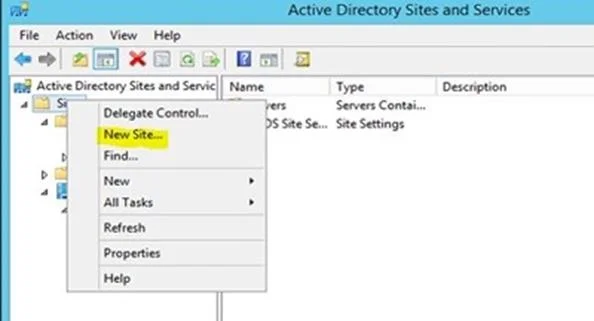
Phase 1: Creating a new site Step 1: Navigate to Server Manager > Tools > Active Directory Sites and Services Step 2: In the Active Directory Sites and Service window, right-click Sites and select New Site Step 3: Enter Site2 in the Name box Step 4: Select the DEFAULTIPSITELINK and click OK. Step 5: Click OK to complete the site creation Phase 2: Create subnet Step 6: In the Active Directory Sites and Services MMC, right-click Subnets and select New Subnet… Step 7: In the New Object – subnet window, type 192.168.2.0/24 Step 8: In the Select a site object for this prefix option select Site2 and click OK
Exhibit
Options
- APowerShell Desired State Configuration (DSC)
- BLocal security objects
- CGroup Policy Objects (GPOs)
- DMicrosoft Intune configuration profiles
How the community answered
(32 responses)- A13% (4)
- B3% (1)
- C81% (26)
- D3% (1)
Why each option
This question is malformed, as the choices provided are unrelated to the initial task of creating an Active Directory site and subnet, instead focusing on various system management and policy tools. However, Group Policy Objects are central to managing AD environments.
PowerShell Desired State Configuration (DSC) is a management platform for configuring and maintaining systems, but it is a separate mechanism from the primary centralized management within Active Directory provided by GPOs.
Local security objects refer to policies applied directly to individual computers, which do not provide the centralized, domain-wide management capabilities of GPOs.
Group Policy Objects (GPOs) are fundamental to Active Directory, providing a centralized mechanism for applying security settings, software deployments, and system configurations to users and computers within a domain. They are widely used for consistent management across the AD environment.
Microsoft Intune configuration profiles are used for managing devices (especially mobile and cloud-managed) in an Azure AD/Intune environment, distinct from on-premises AD DS GPOs.
Concept tested: Centralized configuration management with Group Policy Objects (GPOs)
Source: https://learn.microsoft.com/en-us/windows-server/identity/ad-ds/get-started/what-is-ad-ds
Topics
Community Discussion
No community discussion yet for this question.