
AZ-800 · Question #225
SIMULATION You need to create a Group Policy Object (GPO) named GPO1 that only applies to a group named MemberServers. To complete this task, sign in the required computer or computers. Answer: Step…
The correct answer is C. By using the Azure portal. This question is malformed, as the choices provided are unrelated to the initial task of creating a Group Policy Object (GPO), instead focusing on Azure onboarding methods. However, if asked about general management interfaces, the Azure portal is a primary tool.
Question
SIMULATION You need to create a Group Policy Object (GPO) named GPO1 that only applies to a group named MemberServers. To complete this task, sign in the required computer or computers. Answer:
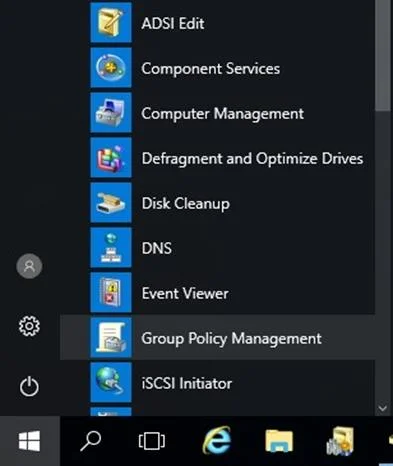
Step 1: Open Group Policy Management by navigating to the Start menu > Windows Administrative Tools, then select Group Policy Management. Step 2: Right-click Group Policy Objects, then select New to create a new GPO. Step 3: Enter a name [here GPO1] for the new GPO that you can identify what it is for easily, then click OK. Step 4: Select the GPO from Group Policy Objects list, then in the Security Filtering section, Add and Remove users, groups, and computers that the GPO should apply to. [Here add group MemberServers] Step 5: Close the GPO Editor when you are done. Now, the GPO is created. Reference:
https://support.globalsign.com/aeg/aeg-how-create-and-link-gpo-active-directory
Exhibit
Options
- AOnboarding with Azure Arc.
- BBy using Azure Arc-enabled servers (recommended)
- CBy using the Azure portal
- DOnboarding directly with Microsoft Defender for Endpoint
How the community answered
(39 responses)- A15% (6)
- B5% (2)
- C77% (30)
- D3% (1)
Why each option
This question is malformed, as the choices provided are unrelated to the initial task of creating a Group Policy Object (GPO), instead focusing on Azure onboarding methods. However, if asked about general management interfaces, the Azure portal is a primary tool.
Onboarding with Azure Arc describes a broader category of integrating on-premises resources with Azure, not the specific interface for carrying out the task.
By using Azure Arc-enabled servers (recommended) describes a specific type of server integration with Azure Arc, not the general interface used to manage the onboarding process.
The Azure portal is the primary web-based interface used to manage all Azure services, including the onboarding of Azure Arc-enabled servers and integration with Microsoft Defender for Cloud for hybrid environments. It provides a centralized graphical user interface for configuration and monitoring.
Onboarding directly with Microsoft Defender for Endpoint is a method of connecting endpoints to Defender for Endpoint, but the Azure portal is often the management interface for configuring this integration.
Concept tested: Azure portal as a management interface
Source: https://learn.microsoft.com/en-us/azure/azure-portal/azure-portal-overview
Topics
Community Discussion
No community discussion yet for this question.