
AZ-500 · Question #535
You have an Azure subscription that contains a virtual network named VNet1. VNet1 contains the subnets shown in the following table. You create the virtual machines shown in the following table. You…
The correct answer is D. VM1, VM2, and VM3 only. Just-in-time (JIT) VM access in Azure Defender for Cloud can be configured for VMs running supported Windows Server versions or specific Linux distributions, regardless of whether they have a public or private IP.
Question
Exhibits
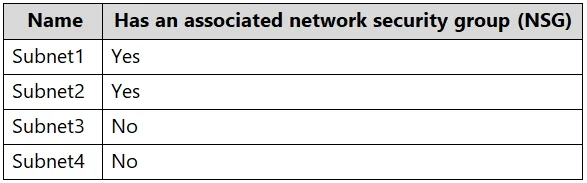
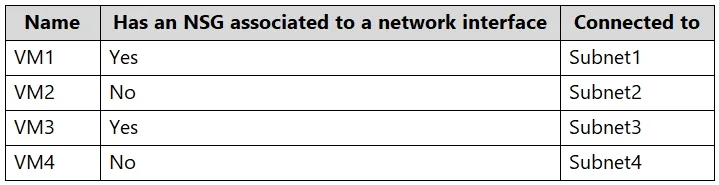
Options
- AVM1 only
- BVM1 and VM2 only
- CVM1 and VM3 only
- DVM1, VM2, and VM3 only
- EVM1, VM2, VM3, and VM4
How the community answered
(17 responses)- B12% (2)
- C6% (1)
- D76% (13)
- E6% (1)
Why each option
Just-in-time (JIT) VM access in Azure Defender for Cloud can be configured for VMs running supported Windows Server versions or specific Linux distributions, regardless of whether they have a public or private IP.
This option is incorrect because VM2 and VM3 also meet the criteria for JIT VM access eligibility.
This option is incorrect because VM3, running Windows Server 2022, is also eligible for JIT VM access.
This option is incorrect because VM2, running Ubuntu Server 20.04, is also eligible for JIT VM access.
JIT VM access supports Windows Server 2012 R2 and later, and specific Linux distributions like Ubuntu. VM1 (Windows Server 2022), VM2 (Ubuntu Server 20.04), and VM3 (Windows Server 2022) all use supported operating systems and can therefore be configured for JIT VM access.
VM4 runs SUSE Linux Enterprise Server, which is not among the explicitly supported Linux distributions for JIT VM access as listed in Microsoft Defender for Cloud's documentation.
Concept tested: JIT VM access operating system support
Source: https://learn.microsoft.com/en-us/azure/defender-for-cloud/just-in-time-access-usage
Community Discussion
No community discussion yet for this question.