
AZ-500 · Question #47
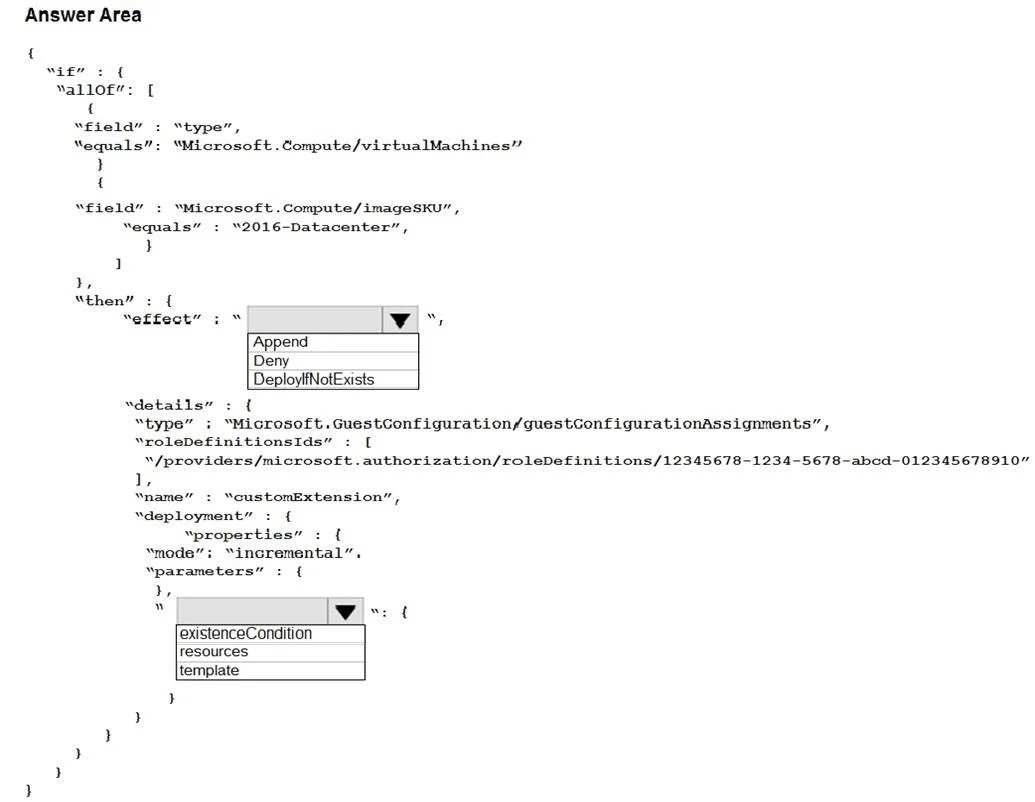
Hotspot Question You have an Azure subscription. The subscription contains Azure virtual machines that run Windows Server 2016. You need to implement a policy to ensure that each virtual machine has…
The correct answer is effect: DeployIfNotExists; parameters: existenceCondition. This question tests knowledge of Azure Policy definitions, specifically how to use the 'deployIfNotExists' effect to automatically deploy a VM extension (antimalware) if it is not already present on virtual machines.
Question
Exhibit
Answer Area
- effectDeployIfNotExistsAppendDenyDeployIfNotExists
- parametersexistenceConditionexistenceConditionresourcestemplate
Explanation
This question tests knowledge of Azure Policy definitions, specifically how to use the 'deployIfNotExists' effect to automatically deploy a VM extension (antimalware) if it is not already present on virtual machines.
Approach. The correct policy effect to use is 'deployIfNotExists', which checks whether a specified resource (in this case, the antimalware VM extension) exists and deploys it if it does not. The policy rule should target 'Microsoft.Compute/virtualMachines' as the resource type and check for the existence of the 'Microsoft.Compute/virtualMachines/extensions' child resource with the type set to 'IaaSAntimalware'. The 'deployment' block within the policy should specify the ARM template that installs the custom antimalware extension, and a 'roleDefinitionIds' field must be included so the policy's managed identity has the 'Contributor' or appropriate RBAC role to perform the deployment. This combination ensures non-compliant VMs automatically receive the antimalware extension without manual intervention.
Concept tested. Azure Policy 'deployIfNotExists' effect: used to audit and automatically remediate resources that do not have a required configuration or child resource (such as a VM extension). It requires a managed identity with sufficient RBAC permissions and an embedded ARM deployment template to enforce the desired state.
Reference. https://docs.microsoft.com/en-us/azure/governance/policy/concepts/effects#deployifnotexists
Topics
Community Discussion
No community discussion yet for this question.