
AZ-500 · Question #45
Hotspot Question You have an Azure Container Registry named Registry1. You add role assignment for Registry1 as shown in the following table. Which users can upload images to Registry1 and download…
This question tests knowledge of Azure Container Registry (ACR) built-in roles and their specific permissions for pushing (uploading) and pulling (downloading) container images.
Question
Exhibit
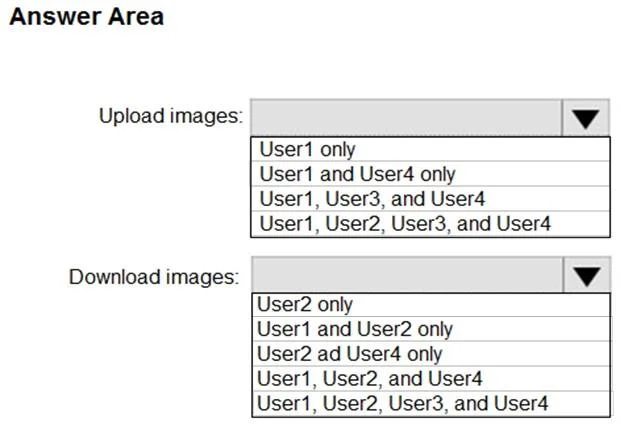
Answer Area
- Upload images:User1 onlyUser1 and User4 onlyUser1, User3, and User4User1, User2, User3, and User4
- Download images:User2 onlyUser1 and User2 onlyUser2 ad User4 onlyUser1, User2, and User4User1, User2, User3, and User4
Explanation
This question tests knowledge of Azure Container Registry (ACR) built-in roles and their specific permissions for pushing (uploading) and pulling (downloading) container images.
Approach. In Azure Container Registry, the key roles are: AcrPull (can only pull/download images), AcrPush (can pull AND push/upload images), AcrDelete (can delete images), Owner/Contributor (full control including push and pull), and Reader (read metadata only, cannot pull images by default without acrPull). For UPLOAD (push): Users need AcrPush, Contributor, or Owner roles. For DOWNLOAD (pull): Users need AcrPull, AcrPush, Contributor, or Owner roles. Reader role does NOT grant the ability to pull or push images - it only allows reading registry metadata. Therefore, only users assigned AcrPush, AcrPull (for download only), Contributor, or Owner roles can interact with image content, while Reader-only users cannot upload or download images.
Concept tested. Azure Container Registry (ACR) role-based access control (RBAC) - specifically the permissions granted by AcrPull, AcrPush, Reader, Contributor, and Owner roles for pushing and pulling container images.
Reference. https://learn.microsoft.com/en-us/azure/container-registry/container-registry-roles
Topics
Community Discussion
No community discussion yet for this question.