nerdexam
Microsoft

AZ-500 · Question #46

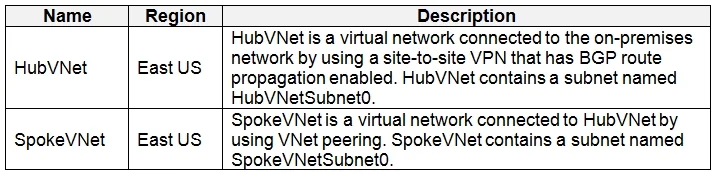
Drag and Drop Question You have an Azure subscription that contains the virtual networks shown in the following table. The Azure virtual machines on SpokeVNetSubnet0 can communicate with the…

The correct answer is GatewaySubnet; HubVNetSubnet0. RT1 should be associated with GatewaySubnet so that traffic arriving from the on-premises network via the VPN/ExpressRoute gateway is redirected to the Azure Firewall's private IP before reaching SpokeVNetSubnet0. RT2 should be associated with HubVNetSubnet0 (or…

Submitted by khalil_dz· Mar 6, 2026Design and Implement Azure Networking / Configure routing and traffic inspection with Azure Firewall in hub-and-spoke topologies (AZ-700 / AZ-104)

Question

Drag and Drop Question You have an Azure subscription that contains the virtual networks shown in the following table. The Azure virtual machines on SpokeVNetSubnet0 can communicate with the computers on the on-premises network. You plan to deploy an Azure firewall to HubVNet. You create the following two routing tables: - RT1: Includes a user-defined route that points to the private IP address of the Azure firewall as a next hop address - RT2: Disables BGP route propagation and defines the private IP address of the Azure firewall as the default gateway You need to ensure that traffic between SpokeVNetSubnet0 and the on-premises network flows through the Azure firewall. To which subnet should you associate each route table? To answer, drag the appropriate subnets to the correct route tables. Each subnet may be used once, more than once, or not at all. You may need to drag the split bar between panes or scroll to view content. NOTE: Each correct selection is worth one point. Answer:

Exhibits

AZ-500 question #46 exhibit 1
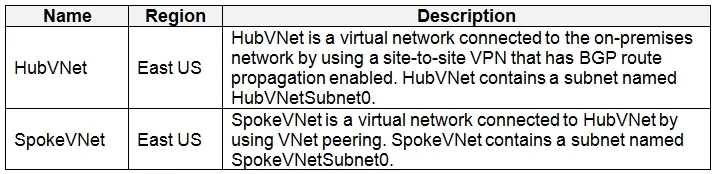
AZ-500 question #46 exhibit 2

Answer Area

Drag items

Azure FirewallSubnetGatewaySubnetHubVNetSubnet0

Correct arrangement

  • GatewaySubnet
  • HubVNetSubnet0

Explanation

RT1 should be associated with GatewaySubnet so that traffic arriving from the on-premises network via the VPN/ExpressRoute gateway is redirected to the Azure Firewall's private IP before reaching SpokeVNetSubnet0. RT2 should be associated with HubVNetSubnet0 (or SpokeVNetSubnet0 peered subnet) to force traffic originating from the spoke network toward the on-premises network through the Azure Firewall as the default gateway, with BGP propagation disabled to prevent the learned on-premises routes from bypassing the firewall. This bidirectional routing through the firewall ensures all traffic between SpokeVNetSubnet0 and the on-premises network is inspected.

Topics

#Azure Firewall#User-Defined Routes (UDR)#Hub-and-Spoke Networking#BGP Route Propagation

Community Discussion

No community discussion yet for this question.

Full AZ-500 Practice