
AZ-500 · Question #49
Hotspot Question You have Azure virtual machines that have Update Management enabled. The virtual machines are configured as shown in the following table. You schedule two update deployments named…
The correct answer is VM1 = No; VM2 = Yes; VM4 = No; VM5 = Yes. This question tests knowledge of Azure Update Management scoping rules, specifically how update deployments are grouped by OS type and connected Log Analytics workspace.
Question
Exhibits
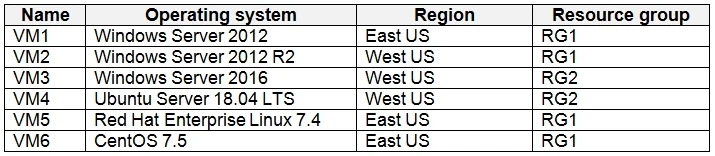
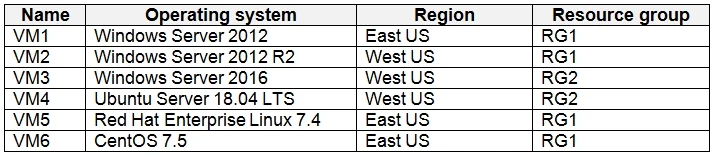
Answer Area
- VM1No
- VM2Yes
- VM4No
- VM5Yes
Explanation
This question tests knowledge of Azure Update Management scoping rules, specifically how update deployments are grouped by OS type and connected Log Analytics workspace.
Approach. In Azure Update Management, an update deployment targets machines based on their OS type (Windows or Linux) and the Log Analytics workspace they report to. Update1 targets VM3 - so it can also update any other virtual machine that shares the same OS type AND the same Log Analytics workspace as VM3. Update2 targets VM6 - so it can also update any other virtual machine sharing the same OS type AND the same Log Analytics workspace as VM6. You cannot mix Windows and Linux machines in the same update deployment, and machines in different workspaces cannot be combined in a single deployment either. Therefore, to determine which additional VMs each deployment can include, you must identify VMs with matching OS and workspace values from the table.
Concept tested. Azure Update Management update deployment scoping - update deployments are constrained by OS type (Windows vs. Linux) and the Log Analytics workspace the VMs report to. A single deployment cannot span different OS types or different workspaces.
Reference. https://docs.microsoft.com/en-us/azure/automation/update-management/overview
Topics
Community Discussion
No community discussion yet for this question.