
AZ-500 · Question #44
Hotspot Question Your company has two offices in Seattle and New York. Each office connects to the Internet by using a NAT device. The offices use the IP addresses shown in the following table. The…
The correct answer is Skip multi-factor authentication for requests from federated users on my intranet = Yes; Call to phone = Yes; Text message to phone = Yes; Notification through mobile app = No; Verification code from mobile app or hardware token = No. This question tests knowledge of Azure AD Multi-Factor Authentication (MFA) service settings, specifically how trusted IPs, remembered devices, and app passwords interact with user MFA requirements based on their location and device state.
Question
Exhibits
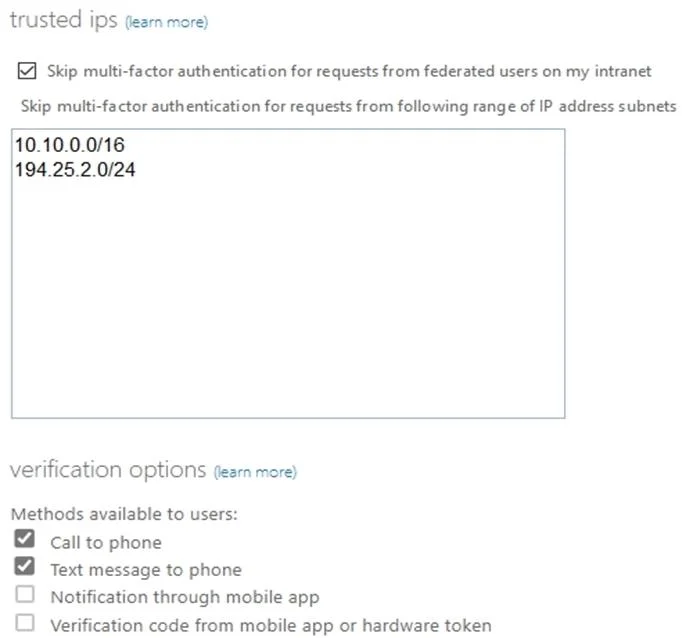
Answer Area
- Skip multi-factor authentication for requests from federated users on my intranetYes
- Call to phoneYes
- Text message to phoneYes
- Notification through mobile appNo
- Verification code from mobile app or hardware tokenNo
Explanation
This question tests knowledge of Azure AD Multi-Factor Authentication (MFA) service settings, specifically how trusted IPs, remembered devices, and app passwords interact with user MFA requirements based on their location and device state.
Approach. To answer hotspot questions about MFA service settings, you must cross-reference each user's location (Seattle or New York office IP ranges) against the configured trusted IPs in MFA settings. If a user's office IP is listed as a trusted IP, MFA is bypassed for that user when signing in from that location. The 'remember MFA on trusted devices' setting means users who check that option won't be prompted for MFA again for the configured number of days on that device. App passwords are only relevant when legacy authentication protocols are used that don't support modern authentication. Each statement must be evaluated by checking: (1) Is the user's source IP in the trusted IPs list? (2) Has the user enabled remembered device? (3) Does the scenario involve a legacy app requiring an app password? Without the actual exhibit values for trusted IPs and user assignments, the general rule is: users signing in from trusted IP ranges skip MFA, users on non-trusted IPs must complete MFA, and remembered devices skip MFA for the configured duration regardless of location.
Concept tested. Azure AD Multi-Factor Authentication service settings including trusted IPs (bypass MFA for specific IP ranges), remember MFA on trusted devices (skip MFA for N days on verified devices), and app passwords (for legacy protocols that don't support MFA challenges), and how these settings interact with user sign-in scenarios from specific office locations.
Reference. https://docs.microsoft.com/en-us/azure/active-directory/authentication/howto-mfa-mfasettings
Topics
Community Discussion
No community discussion yet for this question.