
AZ-500 · Question #233
Hotspot Question You have an Azure subscription that contains an Azure Sentinel workspace. Azure Sentinel is configured to ingest logs from several Azure workloads. A third-party service management…
Azure Sentinel Hotspot - Explanation --- Dropdown 1: When Azure Sentinel identifies a threat, an incident must be created Correct: Analytics Why Analytics is correct: Analytics rules are the core detection engine in Azure Sentinel. They continuously query ingested log data…
Question
Exhibit
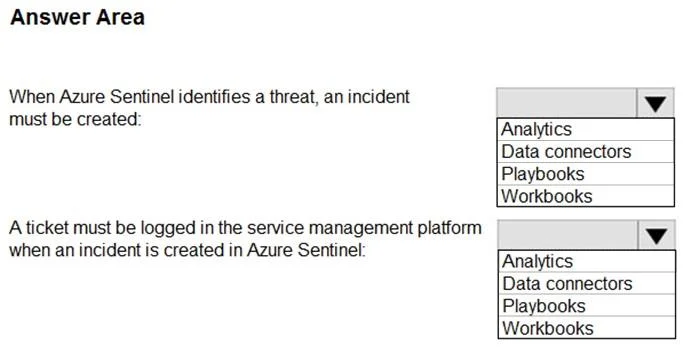
Answer Area
- When Azure Sentinel identifies a threat, an incident must be created:AnalyticsData connectorsPlaybooksWorkbooks
- A ticket must be logged in the service management platform when an incident is created in Azure Sentinel:AnalyticsData connectorsPlaybooksWorkbooks
Explanation
Azure Sentinel Hotspot - Explanation
Dropdown 1: When Azure Sentinel identifies a threat, an incident must be created
Correct: Analytics
Why Analytics is correct: Analytics rules are the core detection engine in Azure Sentinel. They continuously query ingested log data against defined logic (scheduled queries, ML-based, or Microsoft Security rules). When a rule triggers, it creates an alert, and alerts are automatically promoted to incidents. This is exactly the mechanism that turns a detected threat into a trackable incident.
Why the others are wrong:
- Data connectors - These only ingest data into Sentinel (e.g., from Azure AD, Office 365, firewalls). They collect logs but have no detection or incident-creation logic.
- Playbooks - These are automated response actions triggered after an incident already exists. They don't create incidents.
- Workbooks - These are visualization/reporting dashboards for data analysis. They are read-only and have no automation or detection capability.
Dropdown 2: A ticket must be logged in the service management platform when an incident is created
Correct: Playbooks
Why Playbooks is correct: Playbooks are Azure Logic Apps workflows integrated with Sentinel. They can be triggered automatically when an incident is created (via automation rules) and can call external APIs or connectors - including third-party ITSM platforms like ServiceNow, Jira, or Remedy - to log a ticket. This is the standard Sentinel pattern for ITSM integration.
Why the others are wrong:
- Analytics - Creates the incident, but has no outbound integration capability to external platforms.
- Data connectors - Only for data ingestion into Sentinel; they don't send data outbound to external systems.
- Workbooks - Passive dashboards; they display data but cannot trigger actions or call external APIs.
Summary Table
| Requirement | Component | Role |
|---|---|---|
| Threat detected -> incident created | Analytics | Detection rules that generate alerts/incidents |
| Incident created -> ticket in ITSM | Playbooks | Automated response via Logic Apps to external platforms |
Topics
Community Discussion
No community discussion yet for this question.