
AZ-500 · Question #235
Drag and Drop Question You have an Azure Sentinel workspace that has an Azure Active Directory (Azure AD) data connector. You are threat hunting suspicious traffic from a specific IP address. You…
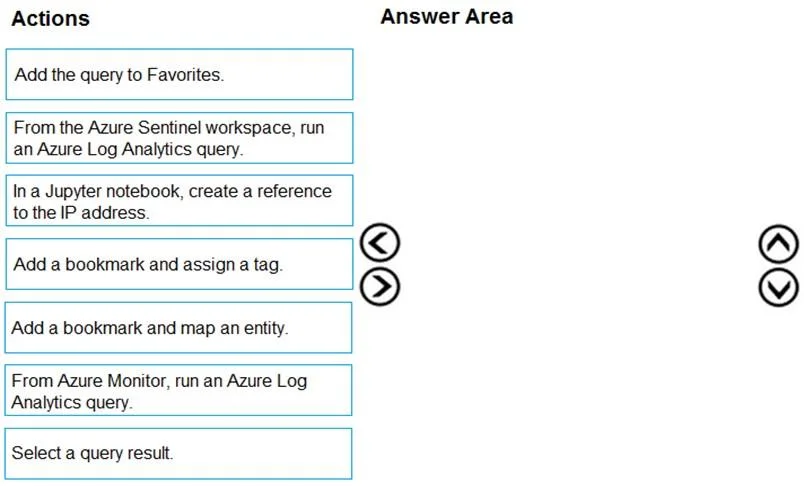
The correct answer is From the Azure Sentinel workspace, run an Azure Log Analytics query.; Select a query result.; Add a bookmark and map an entity. The correct sequence begins with running a Log Analytics query from the Azure Sentinel workspace (not Azure Monitor) to search for traffic from the suspicious IP address. After identifying the relevant event in the query results, you select that specific query result to target…
Question
Exhibit
Answer Area
Drag items
Correct arrangement
- From the Azure Sentinel workspace, run an Azure Log Analytics query.
- Select a query result.
- Add a bookmark and map an entity.
Explanation
The correct sequence begins with running a Log Analytics query from the Azure Sentinel workspace (not Azure Monitor) to search for traffic from the suspicious IP address. After identifying the relevant event in the query results, you select that specific query result to target the intermediate event. Finally, you add a bookmark and map an entity - the 'map an entity' step is critical because it allows the IP address to be recognized as an entity (IP type) that can be referenced and navigated within the Azure Sentinel investigation graph, enabling visual threat hunting traversal.
Topics
Community Discussion
No community discussion yet for this question.