
AZ-500 · Question #218
Hotspot Question You have an Azure subscription that contains a web app named App1 and an Azure key vault named Vault1. You need to configure App1 to store and access the secrets in Vault1. How…
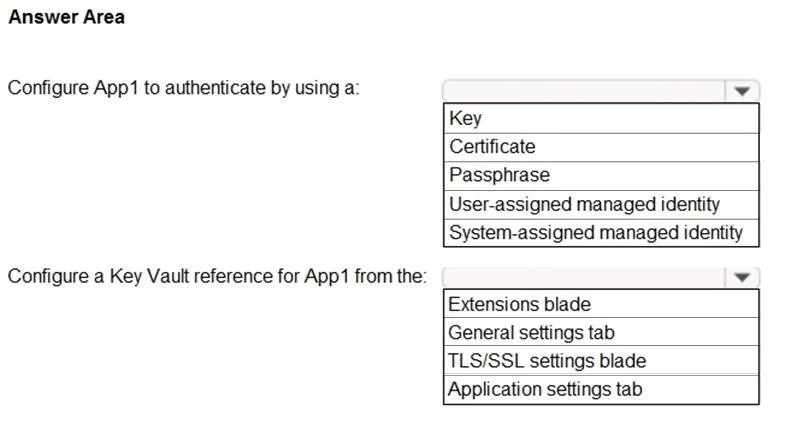
The correct answer is Configure App1 to authenticate by using a:: System-assigned managed identity; Configure a Key Vault reference for App1 from the:: Application settings tab. This question tests your knowledge of how to securely configure an Azure Web App to access secrets stored in Azure Key Vault using Managed Identity and Key Vault access policies or RBAC.
Question
Exhibit
Answer Area
- Configure App1 to authenticate by using a:System-assigned managed identityKeyCertificatePassphraseUser-assigned managed identitySystem-assigned managed identity
- Configure a Key Vault reference for App1 from the:Application settings tabExtensions bladeGeneral settings tabTLS/SSL settings bladeApplication settings tab
Explanation
This question tests your knowledge of how to securely configure an Azure Web App to access secrets stored in Azure Key Vault using Managed Identity and Key Vault access policies or RBAC.
Approach. To configure App1 to access Vault1, you must first enable a System-Assigned Managed Identity on App1 under Settings > Identity. This gives App1 an Azure AD identity without needing to manage credentials. Next, in Vault1, you grant that managed identity the appropriate Key Vault access policy (or RBAC role such as 'Key Vault Secrets User') so it has permission to Get/List secrets. Finally, in App1's application settings or code, you reference the Key Vault secret using a Key Vault reference syntax (@Microsoft.KeyVault(SecretUri=...)) or use the Azure SDK with DefaultAzureCredential, which automatically uses the managed identity to authenticate and retrieve secrets at runtime.
Concept tested. Configuring Azure App Service Managed Identity integration with Azure Key Vault, including enabling system-assigned managed identity on the web app, granting Key Vault access permissions to that identity, and referencing Key Vault secrets securely from the application.
Reference. https://learn.microsoft.com/en-us/azure/app-service/app-service-key-vault-references
Topics
Community Discussion
No community discussion yet for this question.