
AZ-500 · Question #217
Hotspot Question You plan to use Azure Sentinel to create an analytic rule that will detect suspicious threats and automate responses. Which components are required for the rule? To answer, select…
This hotspot question tests knowledge of the required components when creating an Azure Sentinel (now Microsoft Sentinel) analytic rule that detects threats and automates responses.
Question
Exhibit
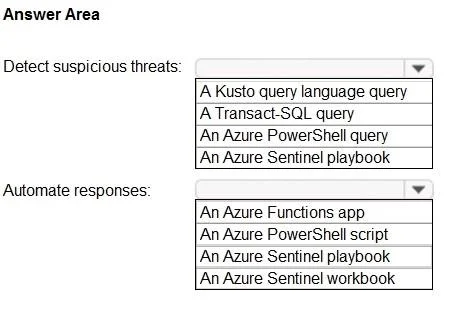
Answer Area
- Detect suspicious threats:A Kusto query language queryA Transact-SQL queryAn Azure PowerShell queryAn Azure Sentinel playbook
- Automate responses:An Azure Functions appAn Azure PowerShell scriptAn Azure Sentinel playbookAn Azure Sentinel workbook
Explanation
This hotspot question tests knowledge of the required components when creating an Azure Sentinel (now Microsoft Sentinel) analytic rule that detects threats and automates responses.
Approach. To create an analytic rule in Microsoft Sentinel that detects suspicious threats, you need a 'Scheduled query rule' (or another rule type like Fusion, Microsoft Security, or ML-based), which requires a KQL (Kusto Query Language) query to define the detection logic, a schedule/frequency for how often the query runs, and a threshold to determine when an alert is triggered. To automate responses, you need a 'Playbook' (built on Azure Logic Apps) attached via an automation rule - the playbook defines the automated actions taken when an alert or incident is generated. The key required components are: (1) a KQL query for detection logic, (2) a scheduling/frequency setting, (3) an alert threshold, and (4) a playbook for automated response.
Concept tested. Microsoft Sentinel Analytic Rules - understanding the required components: KQL query (detection logic), rule schedule/frequency, alert threshold, and Playbooks (Logic Apps) for automated response via automation rules.
Reference. https://learn.microsoft.com/en-us/azure/sentinel/detect-threats-custom
Topics
Community Discussion
No community discussion yet for this question.