
AZ-500 · Question #53
Hotspot Question You plan to use Azure Log Analytics to collect logs from 200 servers that run Windows Server 2016. You need to automate the deployment of the Microsoft Monitoring Agent to all the…
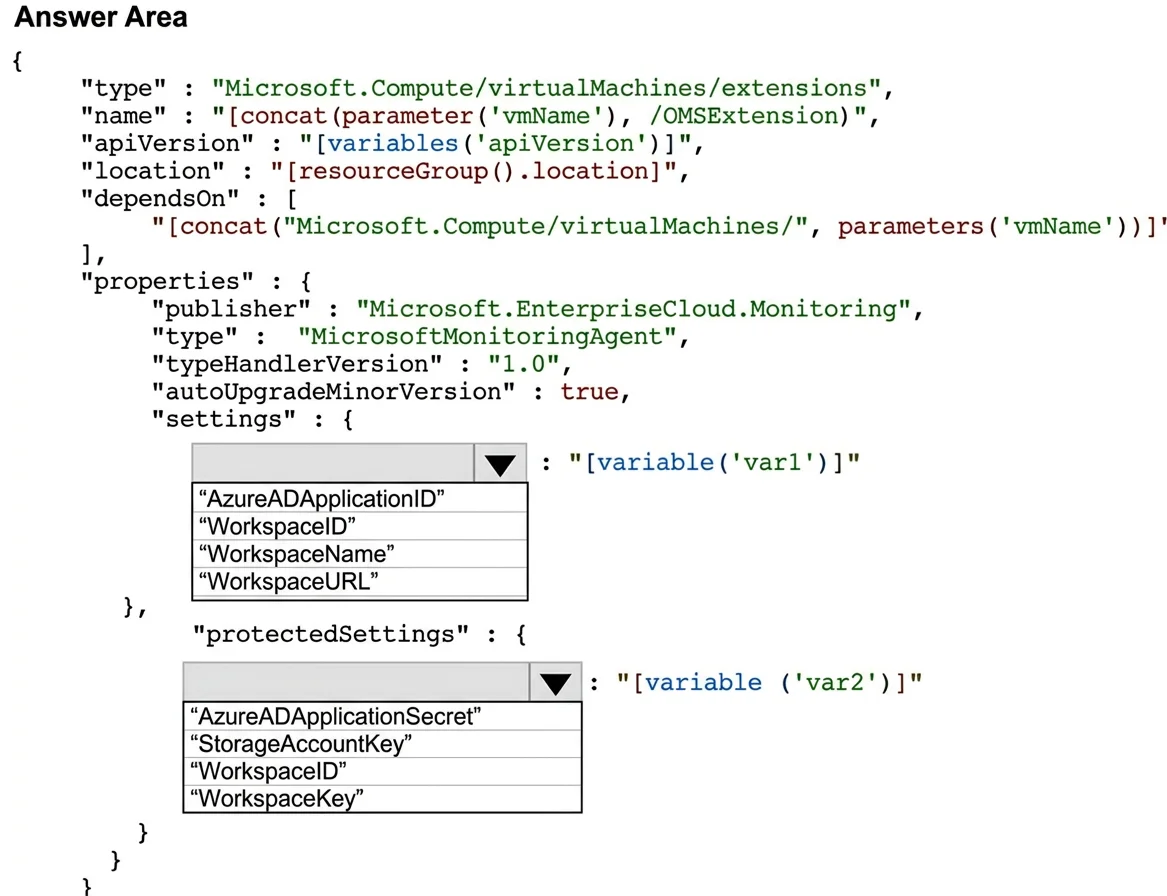
The correct answer is Select key for settings: WorkspaceID; Select key for protectedSettings: WorkspaceKey. This question tests knowledge of deploying the Microsoft Monitoring Agent (MMA) to Windows Server 2016 VMs using an Azure Resource Manager (ARM) template, specifically the correct resource type, API version, and extension properties.
Question
Exhibit
Answer Area
- Select key for settingsWorkspaceIDAzureADApplicationIDWorkspaceIDWorkspaceNameWorkspaceURL
- Select key for protectedSettingsWorkspaceKeyAzureADApplicationSecretStorageAccountKeyWorkspaceIDWorkspaceKey
Explanation
This question tests knowledge of deploying the Microsoft Monitoring Agent (MMA) to Windows Server 2016 VMs using an Azure Resource Manager (ARM) template, specifically the correct resource type, API version, and extension properties.
Approach. To deploy the Microsoft Monitoring Agent via ARM template, you use the VM extension resource type 'Microsoft.Compute/virtualMachines/extensions'. The 'type' property for the extension must be set to 'MicrosoftMonitoringAgent', the 'publisher' must be 'Microsoft.EnterpriseCloud.Monitoring', and the 'typeHandlerVersion' is typically '1.0'. In the 'settings' block, you provide the 'workspaceId' of the Log Analytics workspace, and in the 'protectedSettings' block, you provide the 'workspaceKey'. This ensures all 200 Windows Server 2016 machines connect to the correct Log Analytics workspace for log collection.
Concept tested. Deploying the Microsoft Monitoring Agent (Log Analytics Agent) to Windows VMs using ARM templates, including the correct extension publisher ('Microsoft.EnterpriseCloud.Monitoring'), extension type ('MicrosoftMonitoringAgent'), and required settings (workspaceId in settings, workspaceKey in protectedSettings) for Azure Log Analytics integration.
Reference. https://docs.microsoft.com/en-us/azure/virtual-machines/extensions/oms-windows
Topics
Community Discussion
No community discussion yet for this question.