
AZ-500 · Question #54
Hotspot Question You suspect that users are attempting to sign in to resources to which they have no access. You need to create an Azure Log Analytics query to identify failed user sign-in attempts…
The correct answer is Select the field for the condition '==4625': EventID; Select the function for 'failed_login_attempts': Count(). This question tests your ability to construct a KQL (Kusto Query Language) query in Azure Log Analytics to detect failed sign-in attempts, filtering by time range and aggregating results to find users exceeding a threshold.
Question
Exhibit
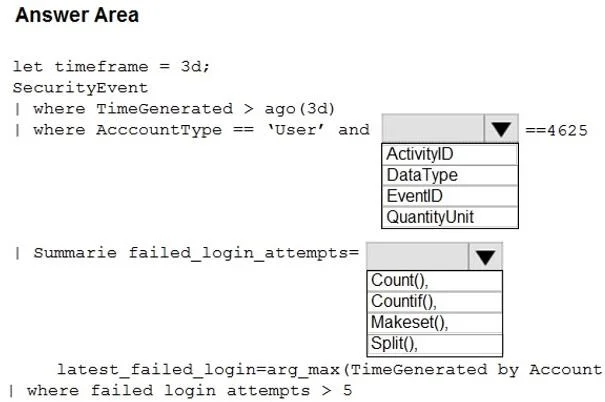
Answer Area
- Select the field for the condition '==4625'EventIDActivityIDDataTypeEventIDQuantityUnit
- Select the function for 'failed_login_attempts'Count()Count()Countif()Makeset()Split()
Explanation
This question tests your ability to construct a KQL (Kusto Query Language) query in Azure Log Analytics to detect failed sign-in attempts, filtering by time range and aggregating results to find users exceeding a threshold.
Approach. The correct query uses the SigninLogs table, filters with 'where TimeGenerated > ago(3d)' to limit to the last three days, and filters for failed sign-ins using 'where ResultType != 0' or 'where ResultType == "50126"' (or similar failure codes). The results are then aggregated using 'summarize FailedAttempts = count() by UserPrincipalName' to count failures per user, followed by 'where FailedAttempts > 5' to filter only users exceeding five failed attempts. Optionally, 'order by FailedAttempts desc' can be appended to sort results. The key components are: (1) correct table name 'SigninLogs', (2) time filter 'ago(3d)', (3) ResultType filter for failures, (4) summarize with count(), and (5) having/where clause for > 5 attempts.
Concept tested. Writing KQL queries in Azure Log Analytics using SigninLogs table, time filtering with ago(), result type filtering for failed sign-ins, summarize aggregation, and threshold filtering to detect suspicious authentication patterns.
Topics
Community Discussion
No community discussion yet for this question.