
AZ-500 · Question #213
Hotspot Question You have an Azure Sentinel workspace that contains an Azure Active Directory (Azure AD) connector, an Azure Log Analytics query named Query1 and a playbook named Playbook1. Query1…
To create a custom query-based analytic rule that triggers a playbook, you must select 'Scheduled' for the rule type and ensure the playbook includes 'A trigger' to be callable by Azure Sentinel.
Question
Exhibit
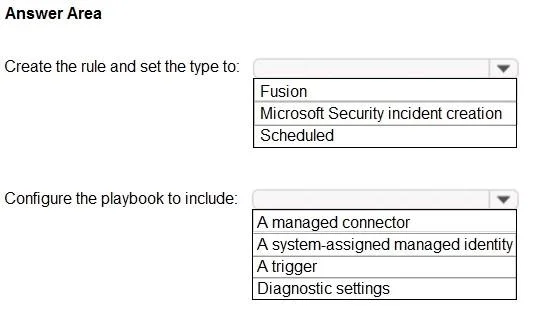
Answer Area
- Create the rule and set the type to:FusionMicrosoft Security incident creationScheduled
- Configure the playbook to include:A managed connectorA system-assigned managed identityA triggerDiagnostic settings
Explanation
To create a custom query-based analytic rule that triggers a playbook, you must select 'Scheduled' for the rule type and ensure the playbook includes 'A trigger' to be callable by Azure Sentinel.
Approach. To ensure Playbook1 can be added to the new analytic rule:
-
For 'Create the rule and set the type to:': The question states that the rule will be 'based on Query1', which is an Azure Log Analytics query. This indicates a custom rule that runs on a schedule to execute the query. Therefore, the correct rule type is 'Scheduled'. Fusion rules are built-in by Microsoft for multi-stage attack detection, and Microsoft Security incident creation rules integrate with other Microsoft security services.
-
For 'Configure the playbook to include:': For an Azure Sentinel analytic rule to trigger a playbook, the playbook (which is an Azure Logic App) must have an appropriate trigger that Azure Sentinel can invoke. The most common trigger for this scenario is the 'Azure Sentinel Incident' trigger or 'Azure Sentinel Alert' trigger. Without a trigger, the playbook cannot be started by an external event like an analytic rule. Therefore, the playbook must include 'A trigger'.
By selecting 'Scheduled' for the rule type and ensuring the playbook has 'A trigger', you fulfill the requirements for creating an analytic rule based on a custom query that can successfully trigger a playbook.
Common mistakes.
- common_mistake. Choosing 'Fusion' or 'Microsoft Security incident creation' for the rule type would be incorrect because the scenario explicitly states creating a rule 'based on Query1', which implies a custom, scheduled query. Fusion rules are pre-built, and Microsoft Security incident creation rules are for integrating with other Microsoft security services.
For the playbook configuration, selecting 'A managed connector', 'A system-assigned managed identity', or 'Diagnostic settings' instead of 'A trigger' would be incorrect. While a playbook might use managed connectors to interact with other services or a managed identity for authentication, and diagnostic settings are for logging, none of these directly enable the playbook to be triggered by an Azure Sentinel analytic rule. A trigger is the fundamental component that defines how a Logic App starts its workflow in response to an event.
Concept tested. This question tests the candidate's understanding of Azure Sentinel analytic rule types (specifically creating custom scheduled rules) and the prerequisites for integrating Azure Sentinel analytic rules with Azure Logic Apps (playbooks), emphasizing the necessity of a trigger within the playbook for it to be invoked by an analytic rule.
Topics
Community Discussion
No community discussion yet for this question.